TR_Test - Software
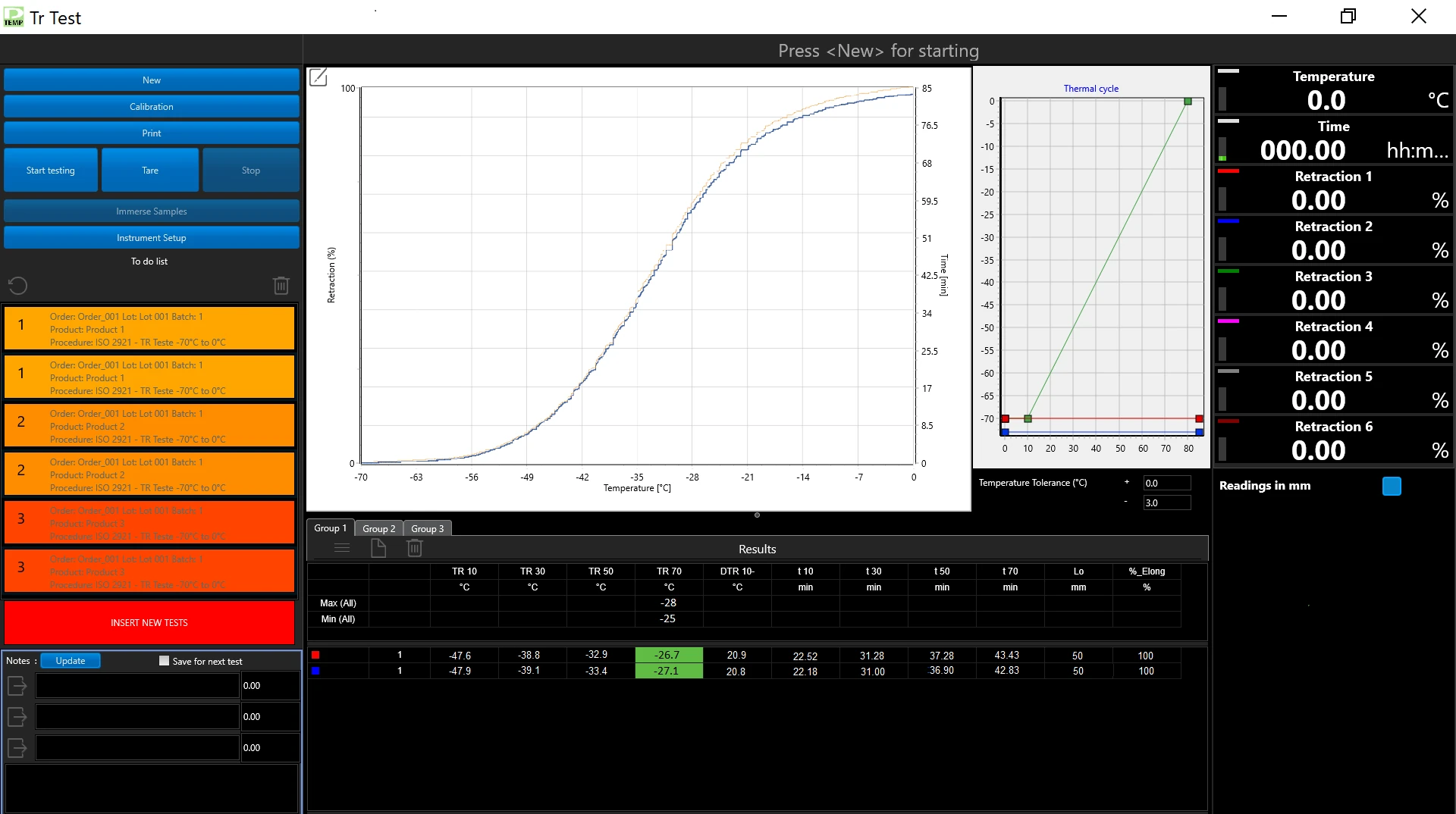
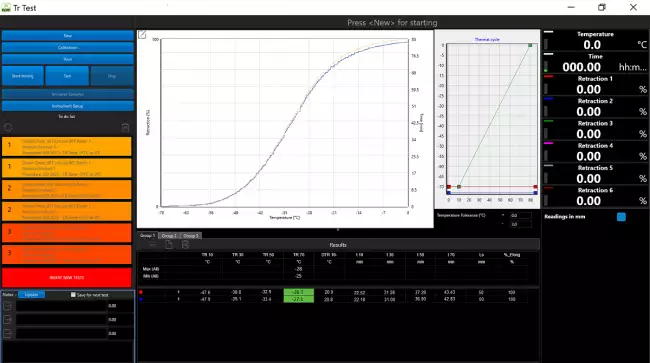
The software permits to set automatically the instrument according to the selected test procedure, to test at the same time up to three groups of samples, to store curves and data.


Overview 
The software permits to:
• Select the Test Procedure, which autmatically sets the instruments
• Enter samples identification (up to 3 products)
• Cool and condition the samples
• Start the test
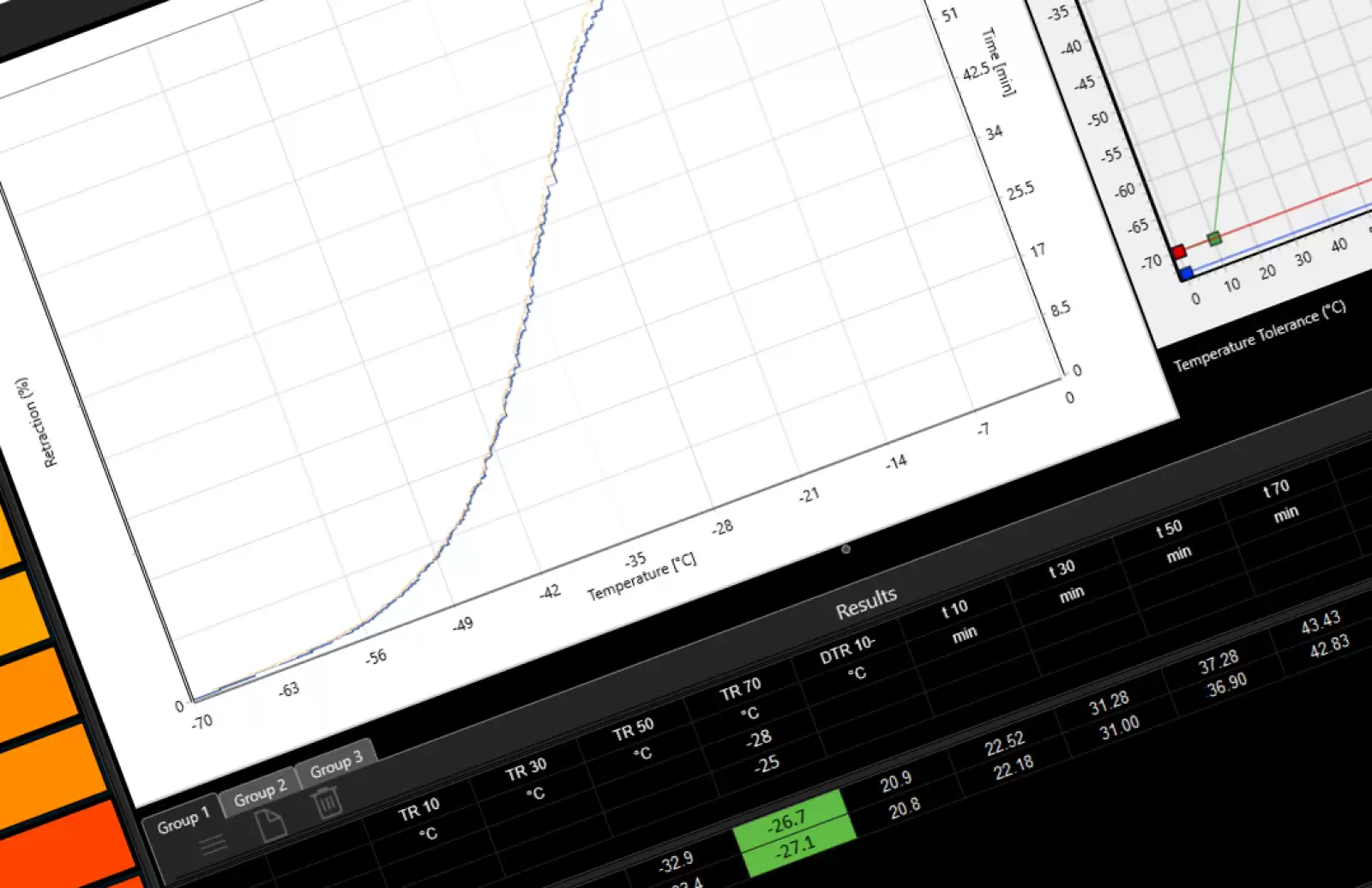
• Plot Retraction Curves for each sample
• Calculate test results and statistics
• Check tolerance limits for each product
• Save results and curves in the standard Gibitre SQL Database

Test Procedures 
The program allows you to prepare test procedures that allow you to define:
• Test conditions
• The results to be calculated

When a Test Procedure is selected, the Instrument Settings and the Test Temperature are adjusted fully automatically

Thermal Cycle 
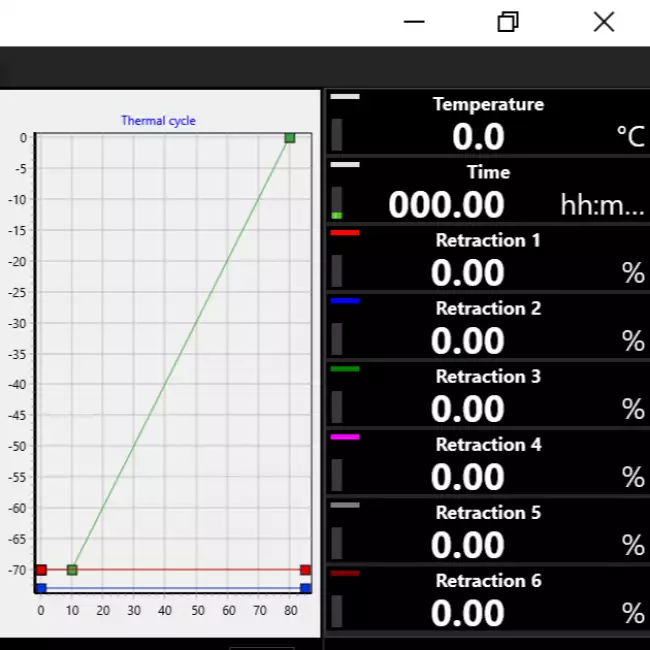
The selected Test procedure defines the Thermal Cycle that the instrument must reproduce for performing the test.
The instrument performs all the adjustments automatically:
• Initial cooling down to the set test start temperature
• Keeping the temperature within the tolerance limits during thermal conditioning
Activation of heating with the Thermal Gradient set up to the final temperature set


Identification of the samples 
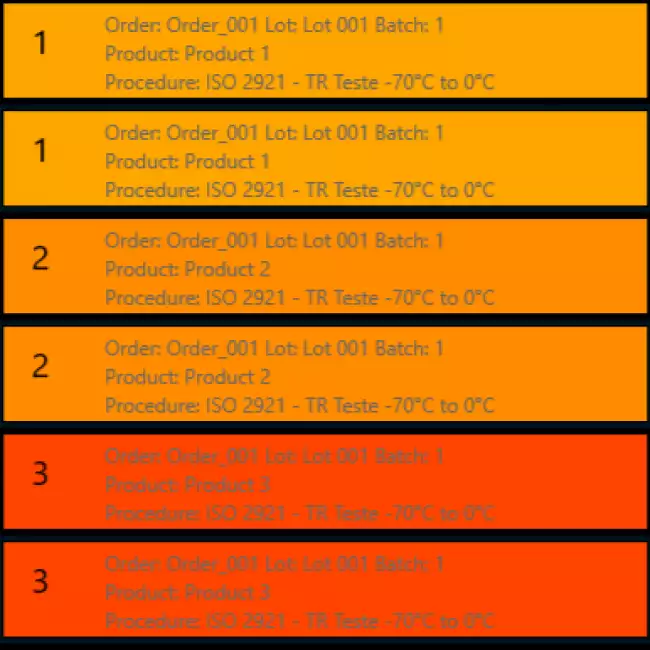
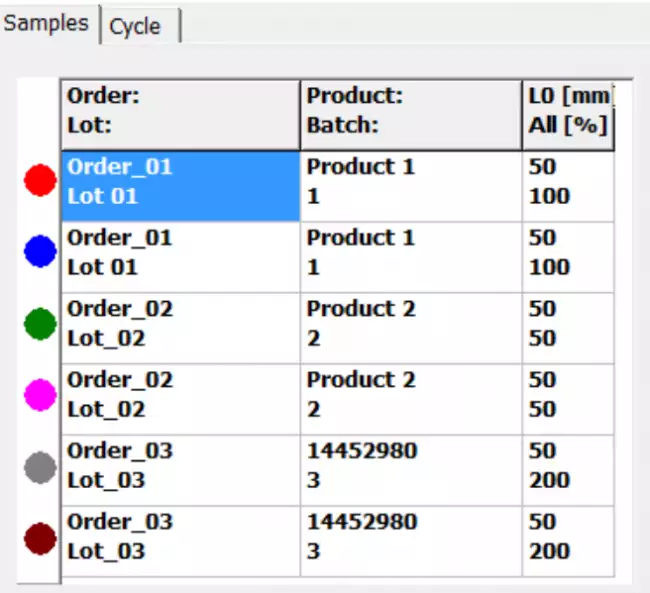
The Instrument allows you to manage the simultaneous execution of 6 specimens.
You can test 6 samples of the same product or you can test at the same time up to 3 Groups of different products in a single thermal cycle:

For each Group of specimens it is possible:
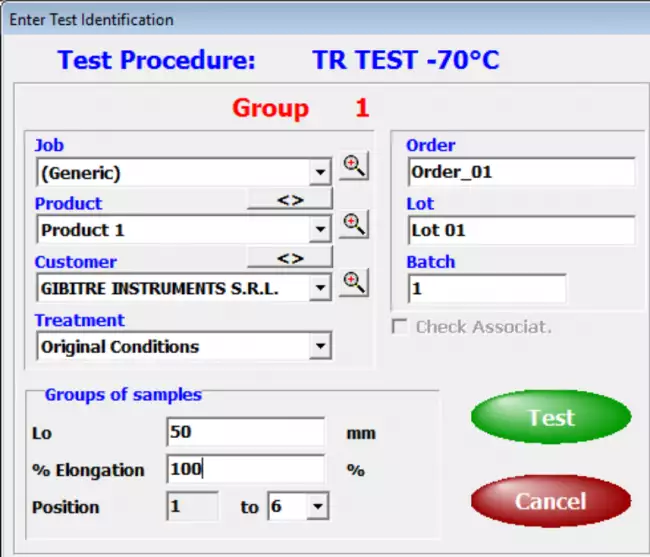
• Enter independent identification
• Define the initial length (L0) and the percentage of initial deformation to be applied.
• Produce a Test Report that includes only the Curves, Results and Statistics relating to the specific group.

The Results and Curves of each specimen are saved independently within the Gibitre SQL Database

Test Curves 
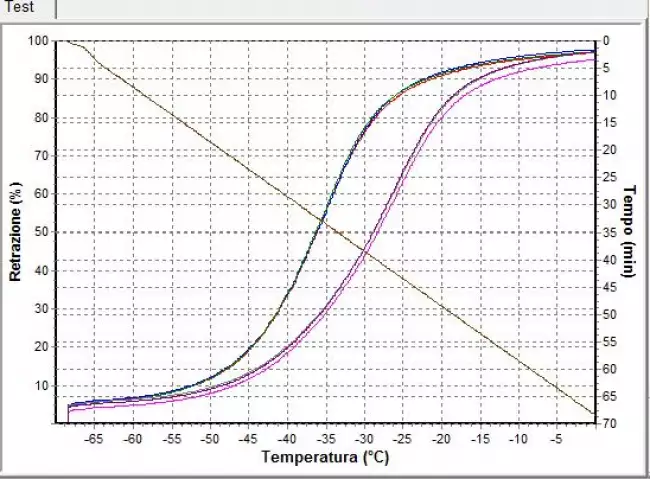
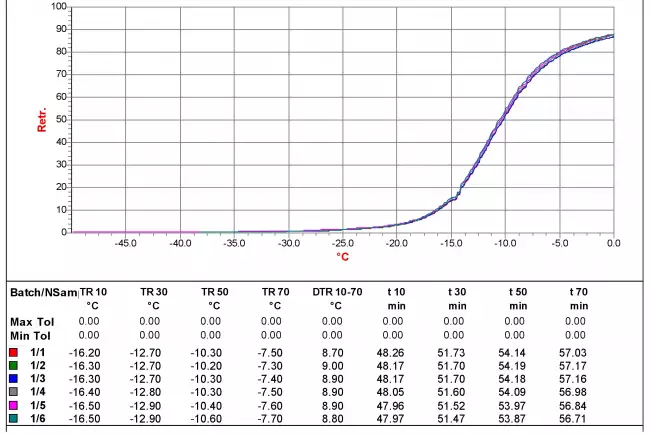
• The curves relating to the tests carried out are shown in different colors to associate them immediately with the relative results.
• By selecting a result, the corresponding curve is automatically highlighted.
• The graphical functions integrated in the programs (scale settings, the number of divisions and zoom) allow you to analyze the curves in detail.
• All the curves are saved in the database together with the test results.

Test report 
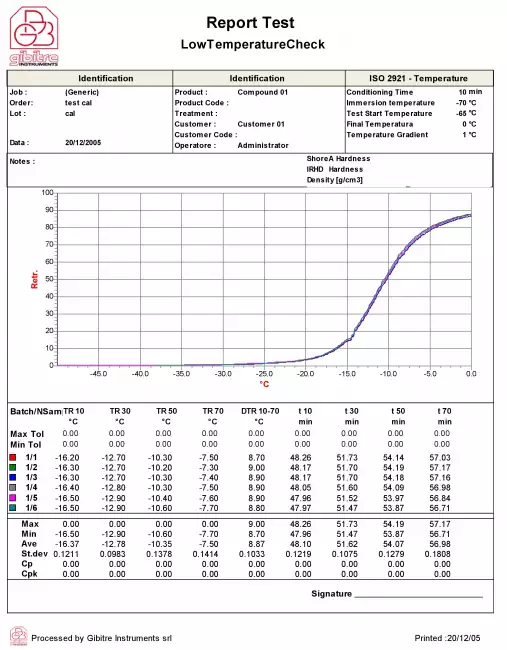
Can be printed or saved to pdf in one of the available languages. The format of the Test Report can be customized by the user.


Tolerance Limits 
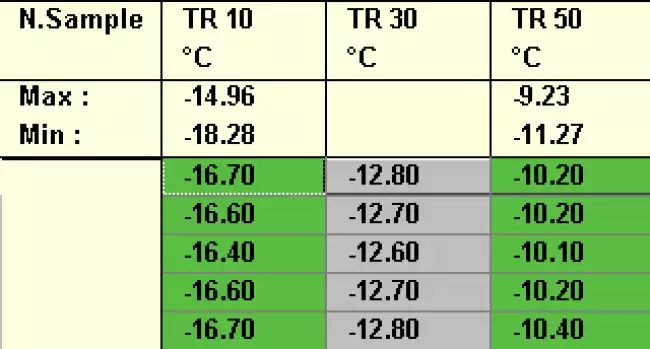
The Datagest program allows you to define specific tolerance limits for each Product, Customer, Test Procedure and Aging Treatment.
For each result to be calculated, tolerance limits and alarm limits can be defined.
The comparison between the results and the tolerance limits is carried out automatically at the end of each test: the test results are colored (Green, Yellow or Red) based on the outcome of the comparison with the limits.
The outcome of the check is saved in the database together with the results.

Statistics of ongoing tests 
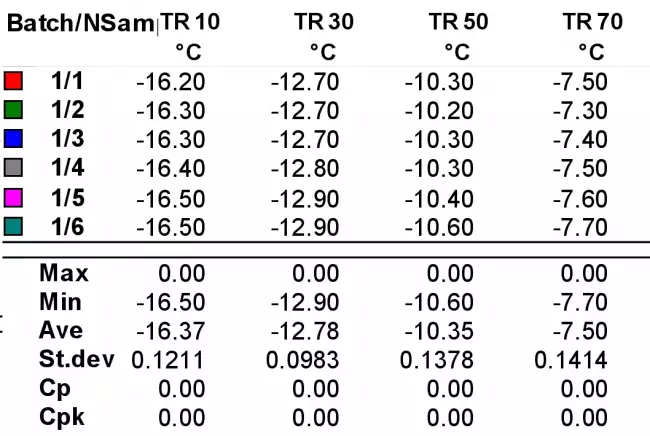
The programs automatically process the statistical analysis of the tests in progress by calculating:
• Maximum
• Minimum
• Average
• Median
• Standard deviation
• Cp
• Cpk
In addition, the Gaussian curve relative to the results is shown together with the tolerance limits to immediately highlight the progress of the tests in progress.
The Datagest program allows you to process more detailed statistics related to the saved results and to represent X and R Charts by grouping data by order, batch, batch, date, etc.

Management of Test Results 
The results and test curves of all the tests carried out are saved in the Gibitre SQL database and are available through the Datagest program.

Datagest is the Laboratory Information Management System (LIMS) which is always installed in combination with all Gibitre instrument-control programs.
The program is the collector for all the test result produced with the instruments connected and permits to manage the common Archives used by the instruments (Product List, Customer List, Tolerance limits, Order List, etc)


Hardware requirements 
• Programs can be installed on standard PCs with WINDOWS 10 or 11 OPERATING SYSTEM.
• The CONNECTION between the instruments and the PC is made using the USB CABLE supplied with the instrument.
• The programs are COMPATIBLE WITH ANTIVIRUS, and other programs installed on the PC.


Language Selection 
All the programs produced by Gibitre are multi-language and allow the operator to select the language of use.
The test report can be produced in the desired language regardless of the language of use of the program.
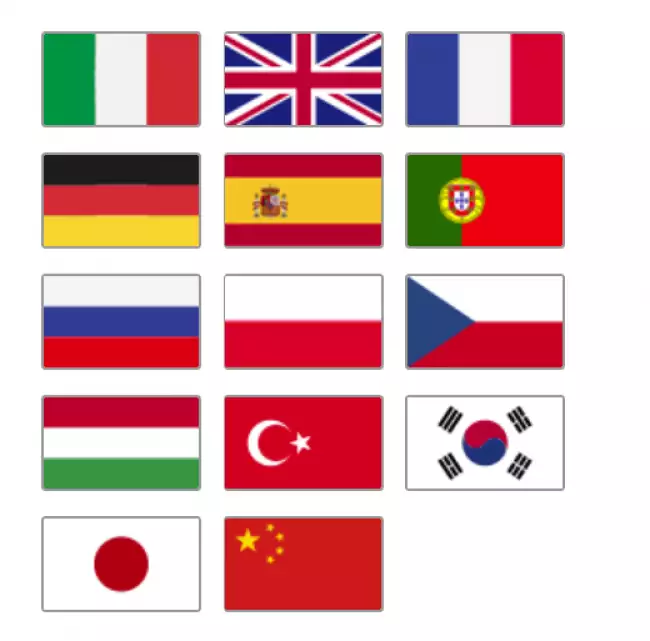
The languages available at the moment are: Italian, English, French, German, Spanish, Portuguese, Russian, Polish, Czech, Turkish, Japanese, Chinese.


Software for TR Test 
The program Gibitre-TR-test, compatible with Windows 10 and 11, controls the complete test sequence and permits to save test results and retraction curves in the standard SQL gibitre database 
Numerical Test Data - TR test 
TR-Test: TR10,TR30,TR50,TR70,TRx (x customer defined) Time at set TR.
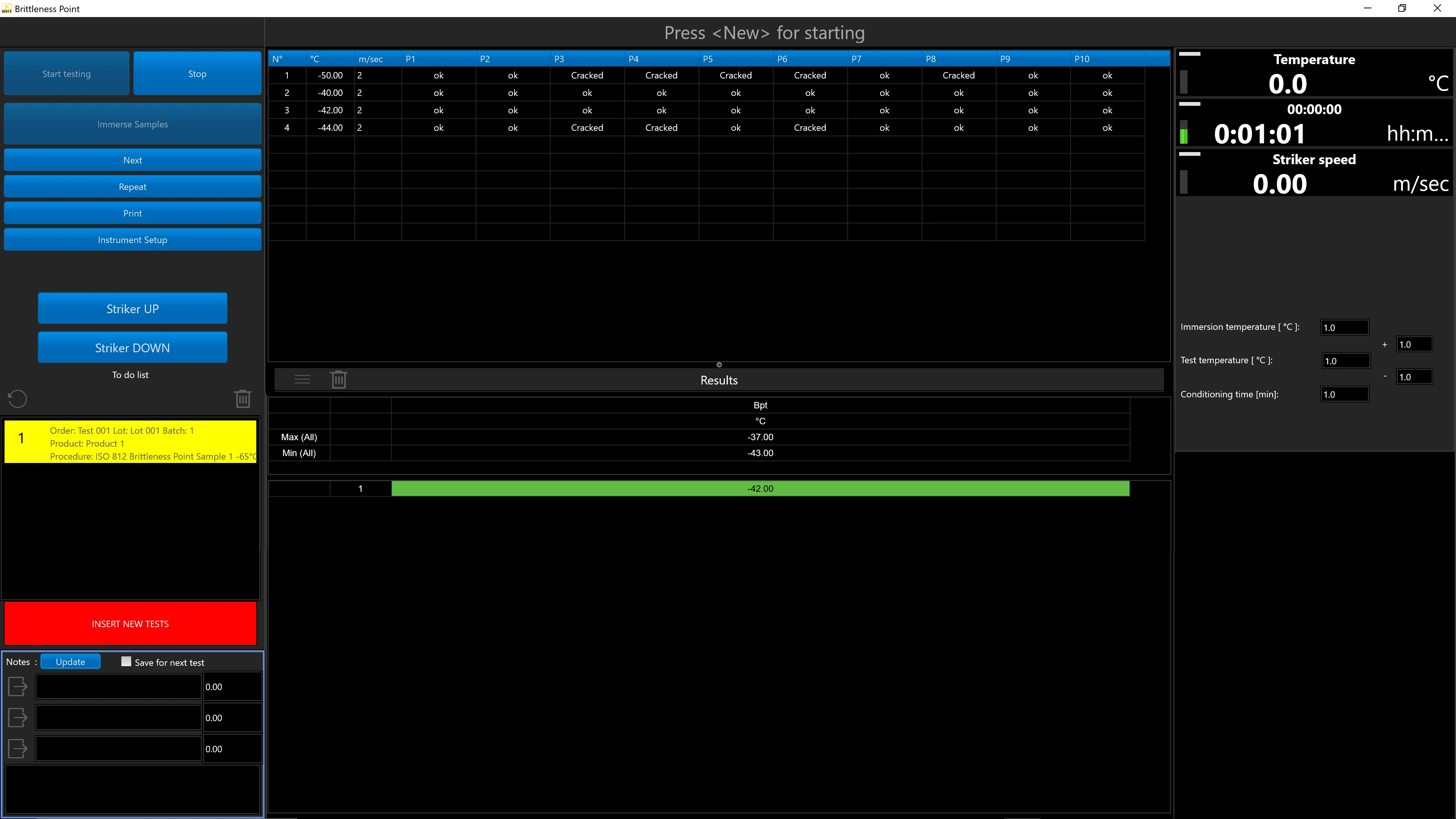
Brittleness Point: Test temperature, Striker speed 
Graphic representation and printout 
Curves of % Retraction vs. Temperature for each sample. Temperature vs Time 


Gibitre Instruments
Via dell'industria, 18
Bergamo (Italy)
te. +39 035 461146
www.gibitre.it
info@gibitre.it

Copyright Gibitre Instruments
The software permits to set automatically the instrument according to the selected test procedure, to test at the same time up to three groups of samples, to store curves and data.
Campi di applicazione  >  Prove su pneumatici  >  Rheocheck MD - Drive
TR_Test - Software
: Gibitreソフトウェア。温度収縮試験(TR)用の低温チェックツールを使用するためのプログラム。ソフトウェアのメインページ。
Get a Quotation

The software permits to set automatically the instrument according to the selected test procedure, to test at the same time up to three groups of samples, to store curves and data.

Overview 

The software permits to:
• Select the Test Procedure, which autmatically sets the instruments
• Enter samples identification (up to 3 products)
• Cool and condition the samples
• Start the test
• Plot Retraction Curves for each sample
• Calculate test results and statistics
• Check tolerance limits for each product
• Save results and curves in the standard Gibitre SQL Database

: TR-Checkは、低温チェック装置で温度引き込み試験を実施するためのソフトウェアです。試験片の試験曲線が表示されたメインページ。
TR-Checkは、低温チェック装置で温度引き込み試験を実施するためのソフトウェアです。試験片の試験曲線が表示されたメインページ。

Test Procedures 

The program allows you to prepare test procedures that allow you to define:
• Test conditions
• The results to be calculated

When a Test Procedure is selected, the Instrument Settings and the Test Temperature are adjusted fully automatically

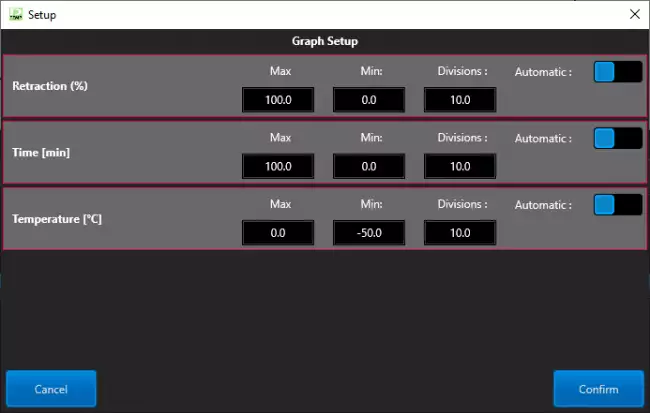
: TRテスト用Low_Tempareture-Checkソフトウェア。グラフのスケールを設定するためのPagian。 : TRテスト用Low_Tempareture-Checkソフトウェア。グラフのスケールを設定するためのPagian。 : バージョン10のTR試験用ソフトウェア。 同時に試験される6つの試験片の識別。

Thermal Cycle 

The selected Test procedure defines the Thermal Cycle that the instrument must reproduce for performing the test.
The instrument performs all the adjustments automatically:
• Initial cooling down to the set test start temperature
• Keeping the temperature within the tolerance limits during thermal conditioning
Activation of heating with the Thermal Gradient set up to the final temperature set

: TRテスト用Low_Tempareture-Checkソフトウェア。メインページ。現在のテストに設定されている熱サイクルの詳細。
TRテスト用Low_Tempareture-Checkソフトウェア。メインページ。現在のテストに設定されている熱サイクルの詳細。
: TR_Test用ソフトウェア。試験曲線と装置が生成した結果の詳細。
 

Identification of the samples 

The Instrument allows you to manage the simultaneous execution of 6 specimens.
You can test 6 samples of the same product or you can test at the same time up to 3 Groups of different products in a single thermal cycle:

For each Group of specimens it is possible:
• Enter independent identification
• Define the initial length (L0) and the percentage of initial deformation to be applied.
• Produce a Test Report that includes only the Curves, Results and Statistics relating to the specific group.

The Results and Curves of each specimen are saved independently within the Gibitre SQL Database

: Gibitreソフトウェア。温度収縮試験(TR)用の低温チェックツールを使用するためのプログラム。ソフトウェアのメインページ。 : Gibitreソフトウェア。温度収縮試験(TR)用の低温チェックツールを使用するためのプログラム。ソフトウェアのメインページ。 : TR-Checkソフトウェア(温度収縮試験用)。試験曲線、計算結果、製品に定義された許容限界との比較を表示するメインページ。

Test Curves 

• The curves relating to the tests carried out are shown in different colors to associate them immediately with the relative results.
• By selecting a result, the corresponding curve is automatically highlighted.
• The graphical functions integrated in the programs (scale settings, the number of divisions and zoom) allow you to analyze the curves in detail.
• All the curves are saved in the database together with the test results.

: カラーテスト曲線:一目でわかる結果
カラーテスト曲線:一目でわかる結果

Test report 

Can be printed or saved to pdf in one of the available languages. The format of the Test Report can be customized by the user.

Example of test Report
: 言語と印刷形式の選択 : 言語と印刷形式の選択 : 低温チェック用ソフトウェア:様々な試験片の結果と試験曲線を含むレポート。

Tolerance Limits 

The Datagest program allows you to define specific tolerance limits for each Product, Customer, Test Procedure and Aging Treatment.
For each result to be calculated, tolerance limits and alarm limits can be defined.
The comparison between the results and the tolerance limits is carried out automatically at the end of each test: the test results are colored (Green, Yellow or Red) based on the outcome of the comparison with the limits.
The outcome of the check is saved in the database together with the results.

: 許容限界の明確な管理
許容限界の明確な管理

Statistics of ongoing tests 

The programs automatically process the statistical analysis of the tests in progress by calculating:
• Maximum
• Minimum
• Average
• Median
• Standard deviation
• Cp
• Cpk
In addition, the Gaussian curve relative to the results is shown together with the tolerance limits to immediately highlight the progress of the tests in progress.
The Datagest program allows you to process more detailed statistics related to the saved results and to represent X and R Charts by grouping data by order, batch, batch, date, etc.

: 統計分析:即時フィードバック
統計分析:即時フィードバック

Management of Test Results 

The results and test curves of all the tests carried out are saved in the Gibitre SQL database and are available through the Datagest program.

Datagest is the Laboratory Information Management System (LIMS) which is always installed in combination with all Gibitre instrument-control programs.
The program is the collector for all the test result produced with the instruments connected and permits to manage the common Archives used by the instruments (Product List, Customer List, Tolerance limits, Order List, etc)

: データゲスト:研究室のための頭脳
データゲスト:研究室のための頭脳
: Gibitreソフトウェア。すべてのプログラムはWindows 11オペレーティングシステムと互換性があります。Windows 11のスクリーンショット。

Hardware requirements 

• Programs can be installed on standard PCs with WINDOWS 10 or 11 OPERATING SYSTEM.
• The CONNECTION between the instruments and the PC is made using the USB CABLE supplied with the instrument.
• The programs are COMPATIBLE WITH ANTIVIRUS, and other programs installed on the PC.

: 標準的なPCで十分
標準的なPCで十分

Language Selection 

All the programs produced by Gibitre are multi-language and allow the operator to select the language of use.
The test report can be produced in the desired language regardless of the language of use of the program.
The languages available at the moment are: Italian, English, French, German, Spanish, Portuguese, Russian, Polish, Czech, Turkish, Japanese, Chinese.

: 言語を選ぶ
言語を選ぶ

Technical specification

Software for TR Test  The program Gibitre-TR-test, compatible with Windows 10 and 11, controls the complete test sequence and permits to save test results and retraction curves in the standard SQL gibitre database  Numerical Test Data - TR test  TR-Test: TR10,TR30,TR50,TR70,TRx (x customer defined) Time at set TR.
Brittleness Point: Test temperature, Striker speed 
Graphic representation and printout  Curves of % Retraction vs. Temperature for each sample. Temperature vs Time 
Download
General catalogue mail request

Low Temperature Check
Vedi anche: ASTM D1414、ISO 974、ASTM D746、ISO 812、ISO 2921、ASTM D1329、ASTM D2137に準拠した低温でのゴムおよびプラスチック製品の特性測定用低温検査装置。
See Also   >
BrittlenessCheck - Software
Vedi anche: Gibitreソフトウェア。脆性点試験用低温チェック装置の使用プログラム。ソフトウェアのメインページ。
See Also   >
News
Call to action
Ask for quotation
a guided way to ask
for a quotation
Mail
info@gibitre.it
The good old e-mail
ready for every season
Phone
+39 035 460146
We welcome your calls Monday through Friday from 8:30 a.m. to 5:30 p.m. in your local time zone.
Newsletter
Subscribe
Stay updated
with the last news
of your sector
Local agent
from: -
See the whole list

In your country
in your language
at your service
Gibitre Instruments S.r.l., Via dell'industria 73, 24126 Bergamo Italia, pec@gibitre-instruments.it P. IVA: IT02827900164 CCIAA REA Bergamo: 326486 | ©2018 - 2026 Gibitre Instruments

Optimist.it
Welcome to the Gibitre Instruments web site
Please chose the preferred Cookie Management.
Benvenuti nel sito Gibitre Instruments
Per continuare scegliete la Gestione dei Cookie che preferite.
Cookies policy
For detailed informations about the use of cookies, please read our
Cookies Management Practice.

Gestione dei Cookies
Per maggiori informazioni sui cookie utilizzati consultate la nostra
Procedura sull'Uso dei Cookies.