Smart Test Identification
The Release 10 of Gibitre programs enables smart test identification methods


Test Identification 
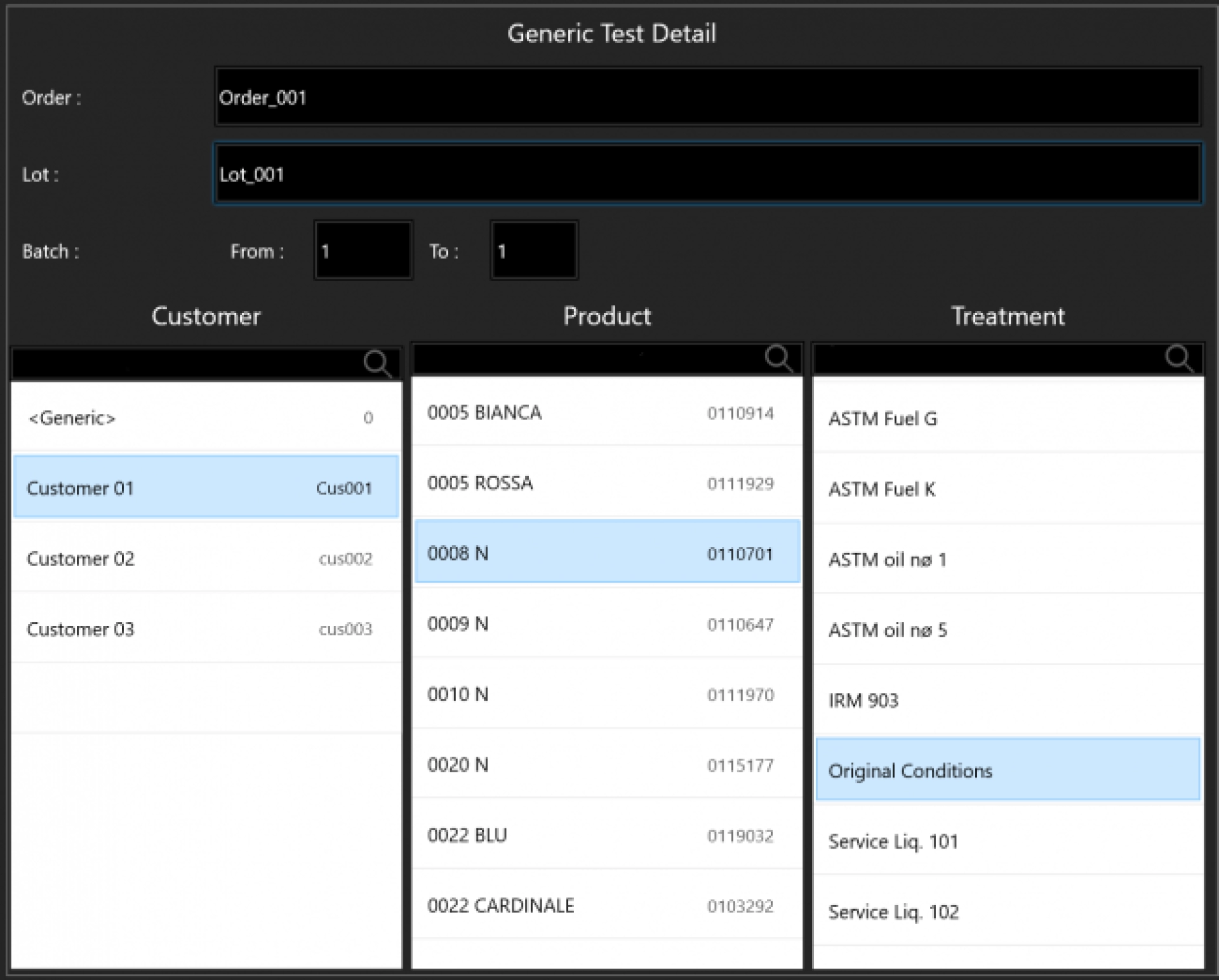
All Gibitre programs permit to identify the test to be carried out simply and quickly.
For each test it is possible to specify:
• Order
• Lot
• Batch
• Customer
• Product
• Specimen preparation or aging treatment
• Date and Time (entered automatically)
• Unique test identifier (entered automatically)
• Notes

Test Identification and Tolerance limits 
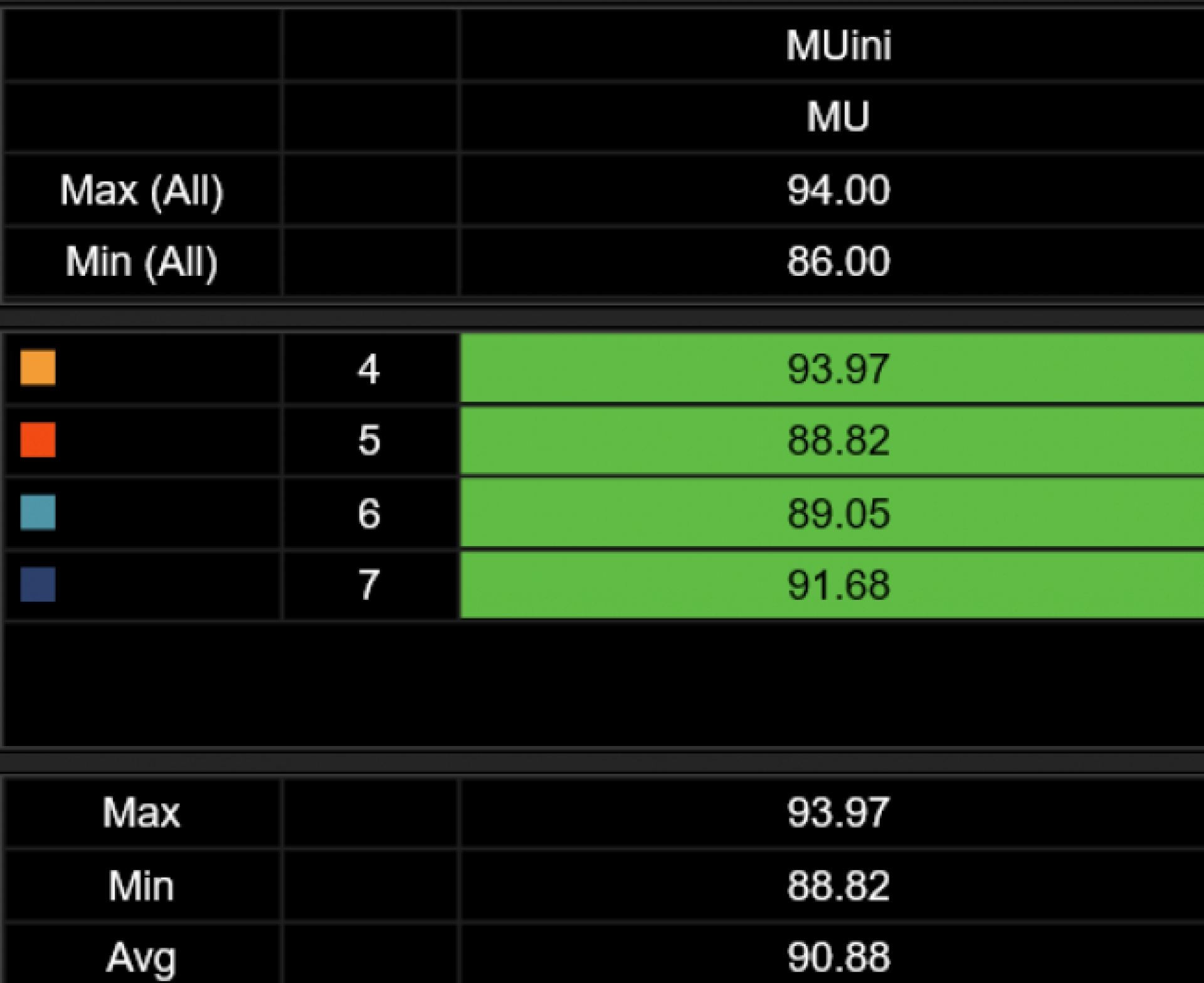
The correct identification of the test allows to automatically activate the control of the tolerance limits foreseen for the product during the test execution. At the end of the test you will immediately know if the test results are ok or not. This information will be saved for further verification.
Test Identification and Traceability 
Identifying the test results correctly is the key to maintaining complete traceability of the archived results.
The Datagest program allows you to retrieve, filter, compare all the archived results with All the instruments connected to the Gibitre database.


The list of pending tests: ToDoList 
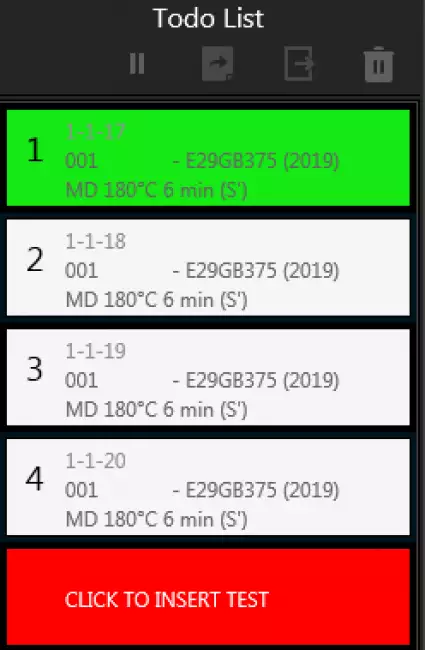
The ToDoList, introduced with version 10 of the Gibitre programs, is the list of tests that the instrument will perform in sequence. Each box corresponds to a test to be performed.
Tests can be inserted, moved and removed in the ToDoList even during tests.
The race test is identified with the green background.
When a test has been completed, the corresponding box is removed from the list.

New Tests to do: Manual Entry 
The easiest method to insert new tests into the ToDoList is manual insertion. By clicking on the insertion button, the user can type Order, Batch, Batch and Specimen and select Product, Customer, Treatment.

New Tests to do: Select a Job with a Single Click 
Manual insertion has two disadvantages:
- Possible typing errors
- Need to enter all data for tests with multiple instruments.
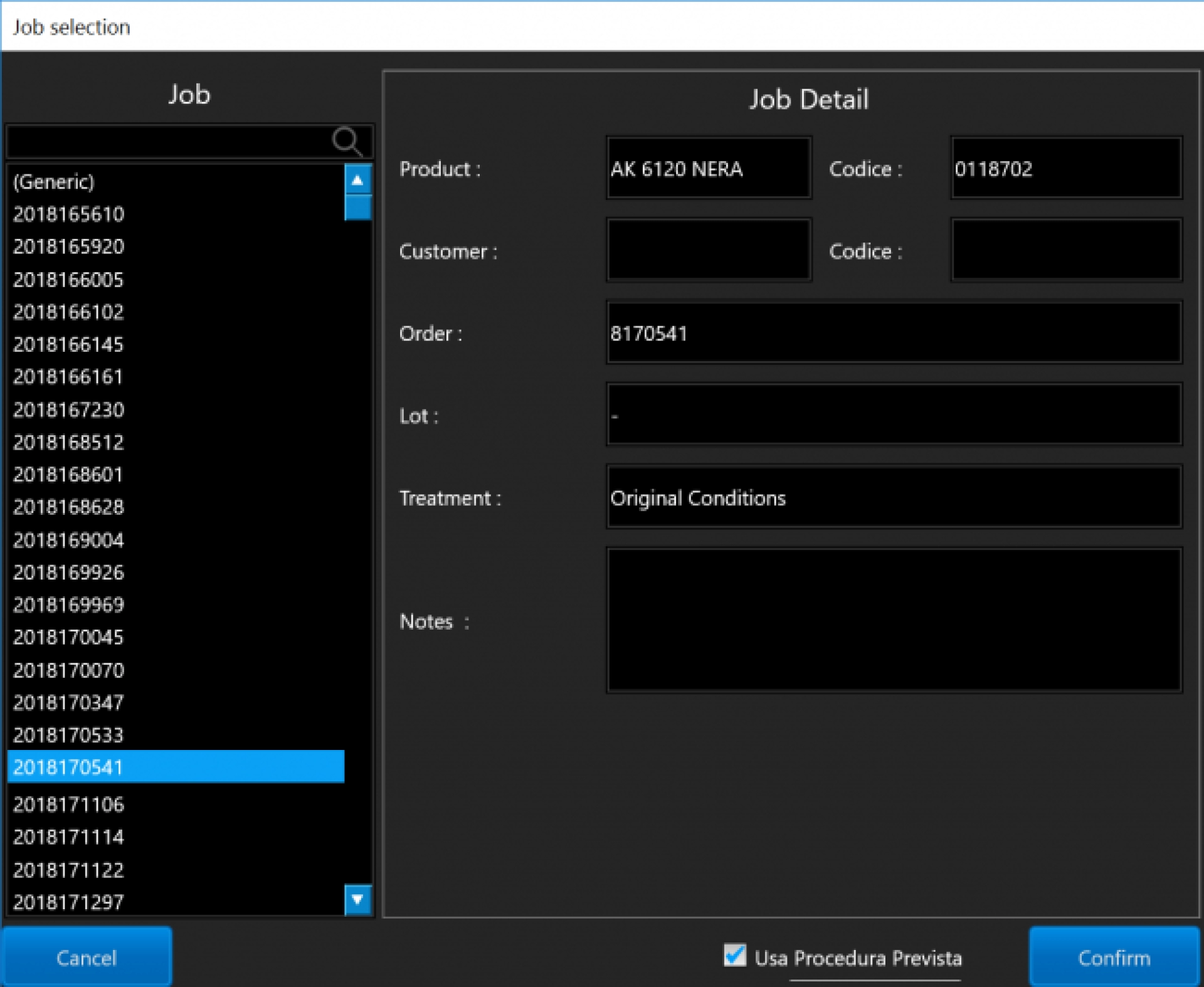
Gibitre programs allow you to select a job code with a single click. All information relating to the test is associated with the Order:
- Order, Batch, Batch, Product, Customer, Treatment, Number of tests to be done, Test procedure to be used.
The same Job code will allow you to identify the test with a click with each instrument from Gibitre!


Management of Jobs 
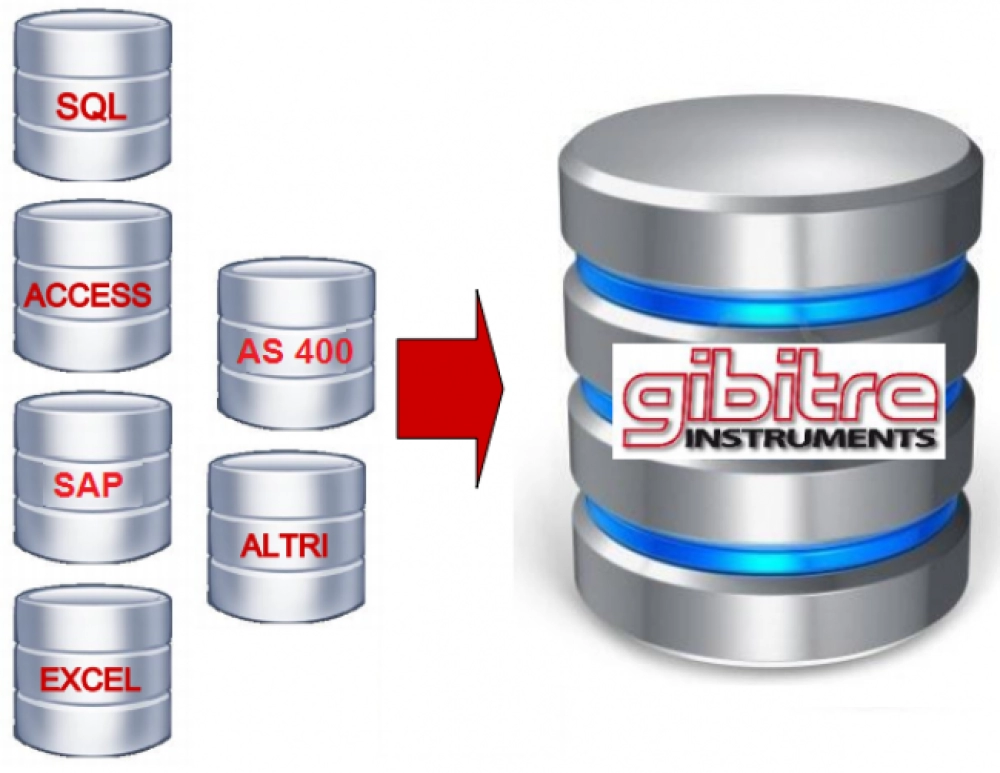
It is possible to manage the Job List manually through the Datagest program but the most efficient method is the synchronization of data with your Business Management Program. Gibitre has developed a simple synchronization program that is helping hundreds of companies since years to have an updated list of orders to be carried out.
Advantages of test Identification by Job Selection 
The advantages are manifold:
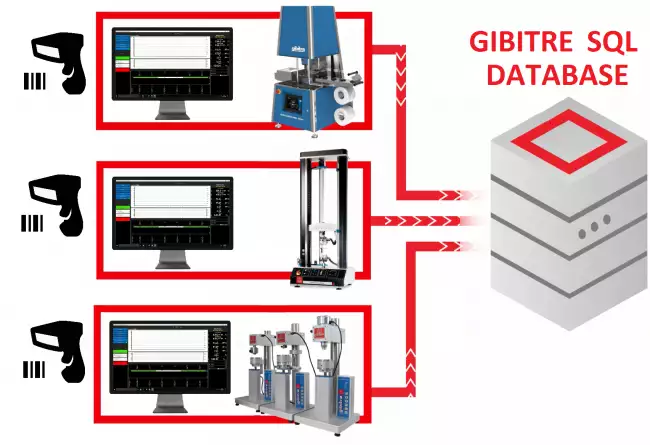
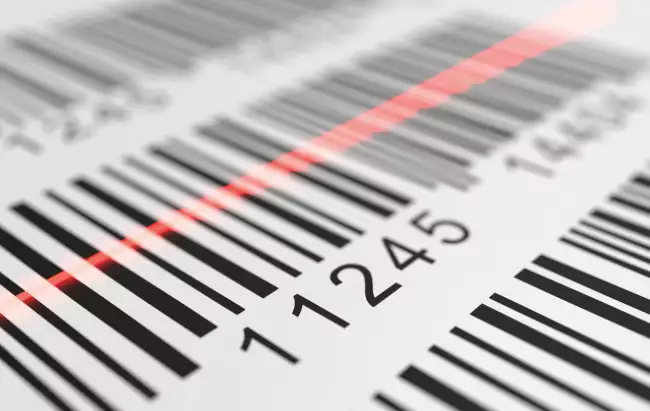
- Ability to use barcode readers
- A single click on the bar code inserts the tests to be done in the ToDoList
- The same Job Order can be recalled from all connected instruments
- No typing errors

Which Procedure must be used for this test? 
Many companies have developed numerous different test procedures to better control products. Sometimes it is difficult to remember which procedure should be used for a specific product.
Version 10 Gibitre programs help you solve this problem: each product can be associated with a specific test procedure through the Datagest program.
More simply, when you use a procedure to make a test, the program will ask you if the same procedure will be used for subsequent tests of the same product.


Gibitre Instruments
Via dell'industria, 18
Bergamo (Italy)
te. +39 035 461146
www.gibitre.it
info@gibitre.it

Copyright Gibitre Instruments
The Release 10 of Gibitre programs enables smart test identification methods
Campi di applicazione  >  Prove su pneumatici  >  Rheocheck MD - Drive
Smart Test Identification
software smart test identification: 클릭 한 번으로 신원 증명 입력
Get a Quotation

The Release 10 of Gibitre programs enables smart test identification methods

Test Identification 

All Gibitre programs permit to identify the test to be carried out simply and quickly.
For each test it is possible to specify:
• Order
• Lot
• Batch
• Customer
• Product
• Specimen preparation or aging treatment
• Date and Time (entered automatically)
• Unique test identifier (entered automatically)
• Notes

software smart test identification: gibitre 소프트웨어 제품군. 모든 프로그램은 테스트할 시료를 식별할 수 있습니다. 주문, 로트, 배치, 제품, 고객, 시료에 수행된 노화 처리를 선택할 수 있습니다.
gibitre 소프트웨어 제품군. 모든 프로그램은 테스트할 시료를 식별할 수 있습니다. 주문, 로트, 배치, 제품, 고객, 시료에 수행된 노화 처리를 선택할 수 있습니다.

Test Identification and Tolerance limits 

The correct identification of the test allows to automatically activate the control of the tolerance limits foreseen for the product during the test execution. At the end of the test you will immediately know if the test results are ok or not. This information will be saved for further verification.

software smart test identification: 모든 gibitre 프로그램은 각 제품, 시험 절차, 고객 및 노화 처리에 대한 허용 한도를 설정할 수 있습니다. 프로그램은 시험 중 설정된 한도 준수를 자동으로 확인합니다.
모든 gibitre 프로그램은 각 제품, 시험 절차, 고객 및 노화 처리에 대한 허용 한도를 설정할 수 있습니다. 프로그램은 시험 중 설정된 한도 준수를 자동으로 확인합니다.

Test Identification and Traceability 

Identifying the test results correctly is the key to maintaining complete traceability of the archived results.
The Datagest program allows you to retrieve, filter, compare all the archived results with All the instruments connected to the Gibitre database.

software smart test identification: 데이터게스트: 실험실을 위한 두뇌
데이터게스트: 실험실을 위한 두뇌
 

The list of pending tests: ToDoList 

The ToDoList, introduced with version 10 of the Gibitre programs, is the list of tests that the instrument will perform in sequence. Each box corresponds to a test to be performed.
Tests can be inserted, moved and removed in the ToDoList even during tests.
The race test is identified with the green background.
When a test has been completed, the corresponding box is removed from the list.

software smart test identification: 릴리스 11의 Gibitre 프로그램 소프트웨어. 할 일 목록: 기기에서 순차적으로 수행해야 할 테스트 목록입니다.
릴리스 11의 Gibitre 프로그램 소프트웨어. 할 일 목록: 기기에서 순차적으로 수행해야 할 테스트 목록입니다.

New Tests to do: Manual Entry 

The easiest method to insert new tests into the ToDoList is manual insertion. By clicking on the insertion button, the user can type Order, Batch, Batch and Specimen and select Product, Customer, Treatment.

software smart test identification: gibitre 소프트웨어 제품군. 모든 프로그램은 테스트할 시료를 식별할 수 있습니다. 주문, 로트, 배치, 제품, 고객, 시료에 수행된 노화 처리를 선택할 수 있습니다.
gibitre 소프트웨어 제품군. 모든 프로그램은 테스트할 시료를 식별할 수 있습니다. 주문, 로트, 배치, 제품, 고객, 시료에 수행된 노화 처리를 선택할 수 있습니다.

New Tests to do: Select a Job with a Single Click 

Manual insertion has two disadvantages:
- Possible typing errors
- Need to enter all data for tests with multiple instruments.
Gibitre programs allow you to select a job code with a single click. All information relating to the test is associated with the Order:
- Order, Batch, Batch, Product, Customer, Treatment, Number of tests to be done, Test procedure to be used.
The same Job code will allow you to identify the test with a click with each instrument from Gibitre!

software smart test identification: gibitre 소프트웨어. 모든 프로그램은 테스트할 샘플을 식별할 수 있습니다. 바코드 리더기와 호환되는 시험 주문 관리 모드를 활성화할 수 있습니다. 생산 주문 관리를 통해 d
gibitre 소프트웨어. 모든 프로그램은 테스트할 샘플을 식별할 수 있습니다. 바코드 리더기와 호환되는 시험 주문 관리 모드를 활성화할 수 있습니다. 생산 주문 관리를 통해 d

Management of Jobs 

It is possible to manage the Job List manually through the Datagest program but the most efficient method is the synchronization of data with your Business Management Program. Gibitre has developed a simple synchronization program that is helping hundreds of companies since years to have an updated list of orders to be carried out.

software smart test identification: 관리 및 실험실 소프트웨어 통합
관리 및 실험실 소프트웨어 통합

Advantages of test Identification by Job Selection 

The advantages are manifold:
- Ability to use barcode readers
- A single click on the bar code inserts the tests to be done in the ToDoList
- The same Job Order can be recalled from all connected instruments
- No typing errors

software smart test identification: Gibitre 소프트웨어. 모든 프로그램에서 바코드 리더기로 증거를 식별할 수 있습니다. 바코드 이미지.
Gibitre 소프트웨어. 모든 프로그램에서 바코드 리더기로 증거를 식별할 수 있습니다. 바코드 이미지.

Which Procedure must be used for this test? 

Many companies have developed numerous different test procedures to better control products. Sometimes it is difficult to remember which procedure should be used for a specific product.
Version 10 Gibitre programs help you solve this problem: each product can be associated with a specific test procedure through the Datagest program.
More simply, when you use a procedure to make a test, the program will ask you if the same procedure will be used for subsequent tests of the same product.

Download
General catalogue mail request

News
Call to action
Ask for quotation
a guided way to ask
for a quotation
Mail
info@gibitre.it
The good old e-mail
ready for every season
Phone
+39 035 460146
We welcome your calls Monday through Friday from 8:30 a.m. to 5:30 p.m. in your local time zone.
Newsletter
Subscribe
Stay updated
with the last news
of your sector
Local agent
from: -
See the whole list

In your country
in your language
at your service
Gibitre Instruments S.r.l., Via dell'industria 73, 24126 Bergamo Italia, pec@gibitre-instruments.it P. IVA: IT02827900164 CCIAA REA Bergamo: 326486 | ©2018 - 2026 Gibitre Instruments
Optimist.it
Welcome to the Gibitre Instruments web site
Please chose the preferred Cookie Management.
Benvenuti nel sito Gibitre Instruments
Per continuare scegliete la Gestione dei Cookie che preferite.
Cookies policy
For detailed informations about the use of cookies, please read our
Cookies Management Practice.

Gestione dei Cookies
Per maggiori informazioni sui cookie utilizzati consultate la nostra
Procedura sull'Uso dei Cookies.