Gibitre Software Platform
A complete package of software products for making testing activity and storage of results easy and efficient
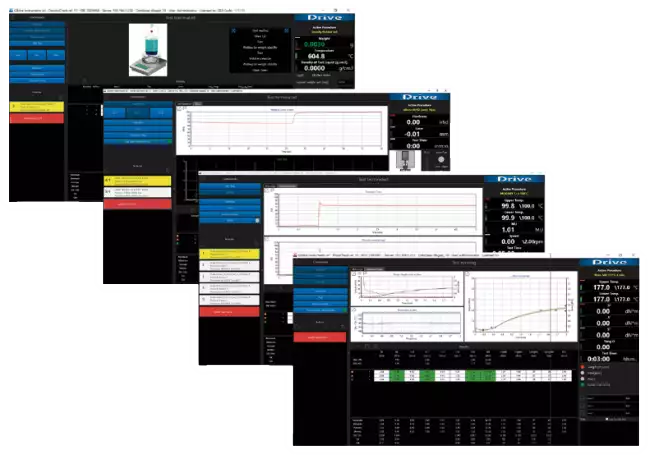


Gibitre Software Products 
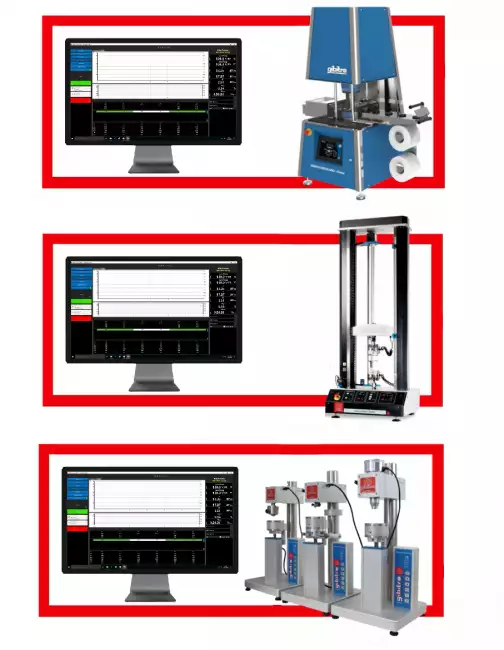
Gibitre has developed a family of software products for the use of pc-controlled instruments. The programs are developed directly by Gibitre and have common features to make it easy to use and learn.
The Instruments controlled with Gibitre Sofware are:
Gli strumenti gestiti tramite software sono:
• Moving Die and Disk Rheometers
• Mooney Viscometer
• Tensile Tester
• Density Tester
• Shore and IRHD Hardness Testers
• TR-Brittleness Point Tester
• Laboratory Press
• Ozone Tester
• Rebound Tester

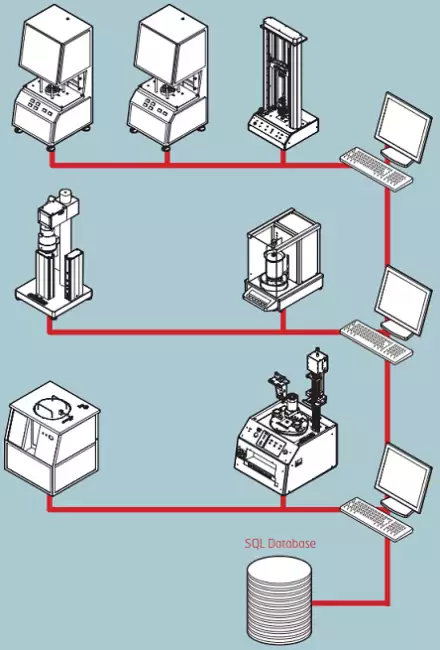
Gibitre Standard SQL Database 
All the Gibitre programs use a database with SQL structure for saving the results.
The database can be installed inside an SQL instance present on the company server or it can be installed on a PC connected to a measuring instrument. The installation of the Microsoft SQL service (Express version) is included in the delivery.


The correct setup for your Lab 
The Gibitre programs allow you to SIMULTANEUSLY CONTROL ALL THE INSTRUMENTS connected to different USB ports of the personal computer.
The choice of the number of Personal computers to be used is made according to the logistic needs of the company and can be easily changed over time.


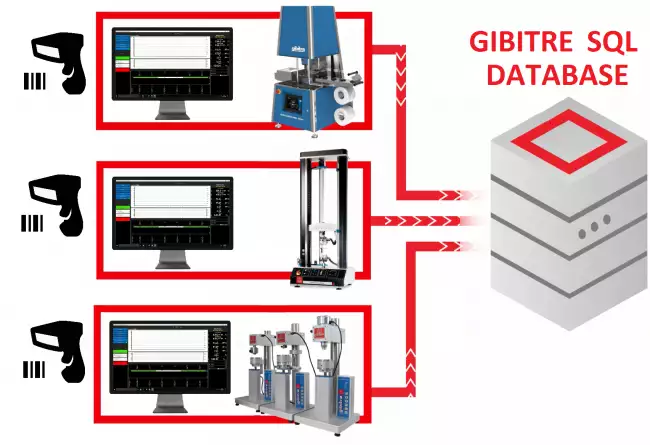
Smart Test Identification 
One of the key characteristics to make an instrument functional is the simplicity in identifying the tests to be carried out.
The new Gibitre release 10 programs allow you to:
• Reduce the time for insertion
• Do not make identification errors
• Identify the correct test procedure for the product
• Have a complete traceability of the archived Results.

Management of Test Results 
The results and test curves of all the tests carried out are saved in the Gibitre SQL database and are available through the Datagest program.

Datagest is the Laboratory Information Management System (LIMS) which is always installed in combination with all Gibitre instrument-control programs.
The program is the collector for all the test result produced with the instruments connected and permits to manage the common Archives used by the instruments (Product List, Customer List, Tolerance limits, Order List, etc)


Test Curves 
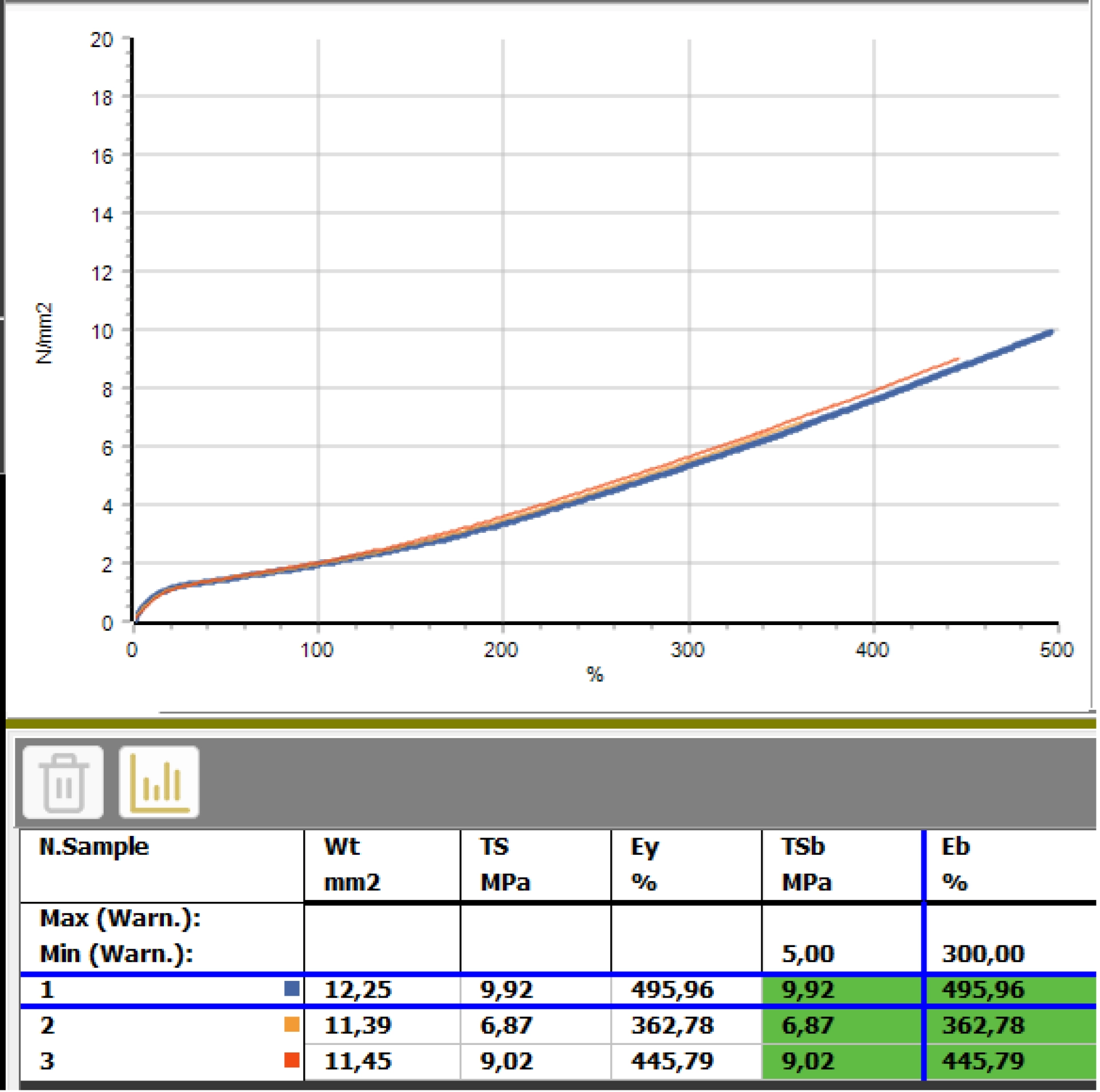
• The curves relating to the tests carried out are shown in different colors to associate them immediately with the relative results.
• By selecting a result, the corresponding curve is automatically highlighted.
• The graphical functions integrated in the programs (scale settings, the number of divisions and zoom) allow you to analyze the curves in detail.
• All the curves are saved in the database together with the test results.


Tolerance Limits 
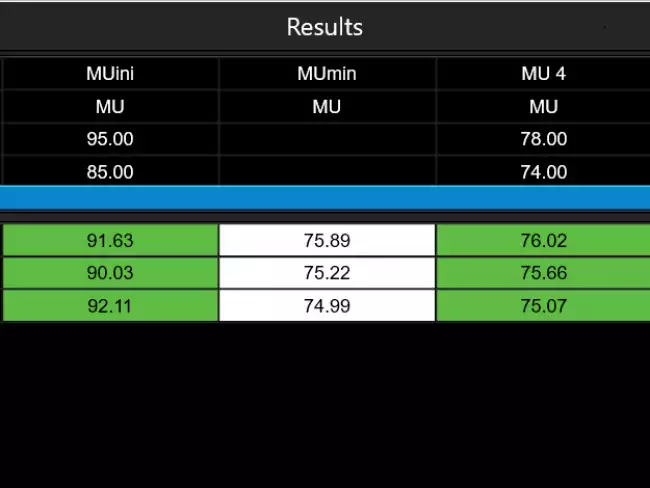
The Datagest program allows you to define specific tolerance limits for each Product, Customer, Test Procedure and Aging Treatment.
For each result to be calculated, tolerance limits and alarm limits can be defined.
The comparison between the results and the tolerance limits is carried out automatically at the end of each test: the test results are colored (Green, Yellow or Red) based on the outcome of the comparison with the limits.
The outcome of the check is saved in the database together with the results.

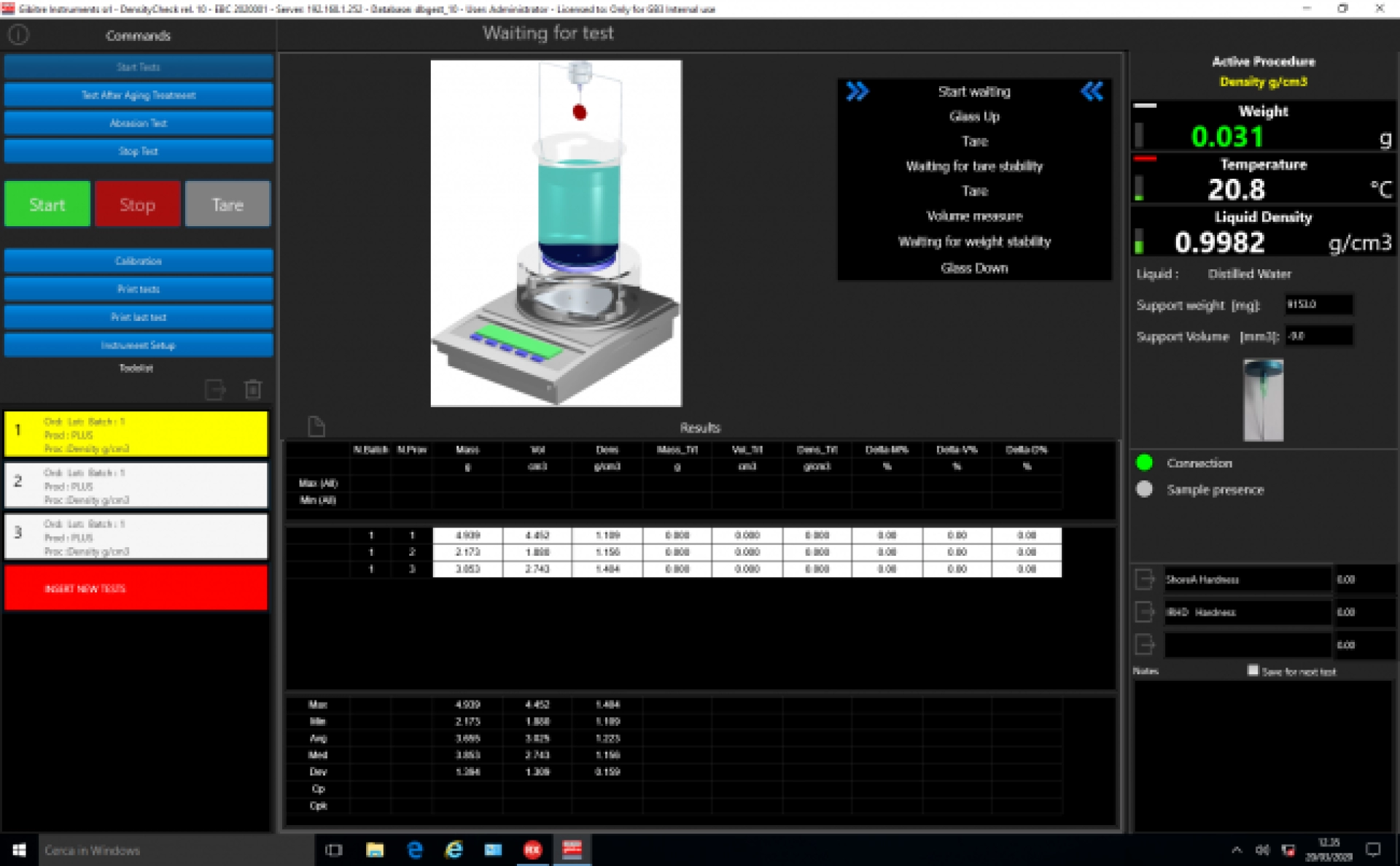
Statistics of ongoing tests 
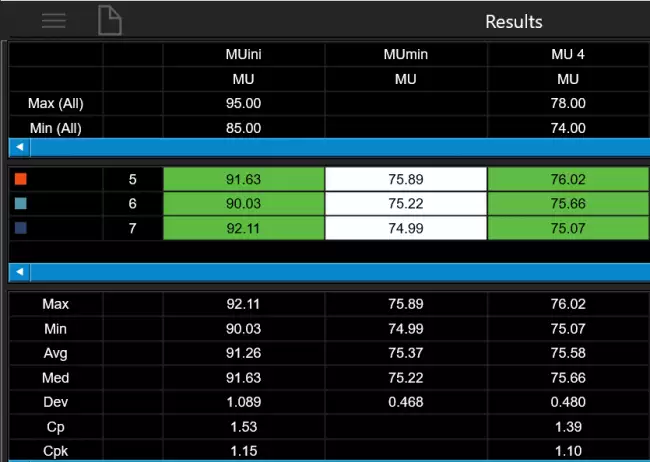
The programs automatically process the statistical analysis of the tests in progress by calculating:
• Maximum
• Minimum
• Average
• Median
• Standard deviation
• Cp
• Cpk
In addition, the Gaussian curve relative to the results is shown together with the tolerance limits to immediately highlight the progress of the tests in progress.
The Datagest program allows you to process more detailed statistics related to the saved results and to represent X and R Charts by grouping data by order, batch, batch, date, etc.

Preparation of Test Reports 
Version 10 programs make the following options available for preparing test reports:
• Selection of printing language
• Company logo insertion
• Print a single test / a Group of tests
• Print of Test Curves
• Print Numerical Results
• Print the Limits of Tolerance
• Print Statistical Results
• Print Legend with explanation of results
• Print the Operator Signature
• Print Customized Notes
• Preparation of PDF file

The program integrates a REPORT EDITOR that allows you to completely edit the report and prepare fully customized report formats.


Language Selection 
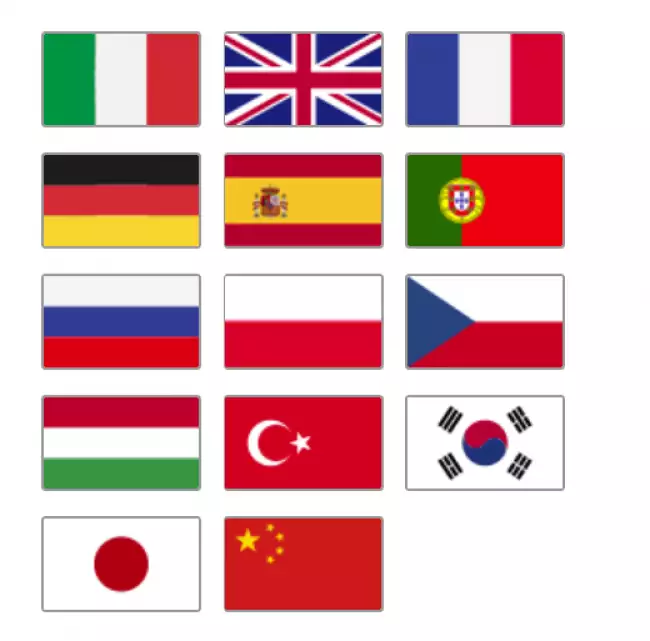
All the programs produced by Gibitre are multi-language and allow the operator to select the language of use.
The test report can be produced in the desired language regardless of the language of use of the program.
The languages available at the moment are: Italian, English, French, German, Spanish, Portuguese, Russian, Polish, Czech, Turkish, Japanese, Chinese.

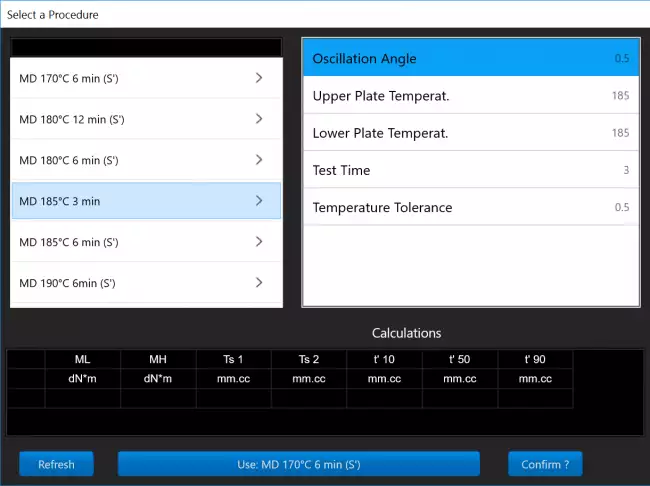
Test Procedures 
The SQL database that is installed together with the tools contains predefined test procedures for each type of Gibitre tool.
Test procedures contain:
• settings for automatic instrument adjustment
• the list of results to be calculated on the basis of what is required by international standards.
The Datagest program allows you to: copy, modify, create the Test Procedures to adapt them to your needs.

Test procedures can be exported and imported. This allows Gibitre Remote Support to support you in the preparation and testing of customized Test Procedures.

Software Upgrade 
Gibitre is continuously developing new versions of Software to introduce new features and to ensure compatibility with new operating systems.
The new programs are compatible with the standard Gibitre SQL database to allow the conservation of the results stored by the customer.
The update of the programs is optional and can be done through Remote Assistance or in combination with the maintenance of the instruments.


Hardware requirements 
• Programs can be installed on standard PCs with WINDOWS 10 or 11 OPERATING SYSTEM.
• The CONNECTION between the instruments and the PC is made using the USB CABLE supplied with the instrument.
• The programs are COMPATIBLE WITH ANTIVIRUS, and other programs installed on the PC.


Gibitre Instruments
Via dell'industria, 18
Bergamo (Italy)
te. +39 035 461146
www.gibitre.it
info@gibitre.it

Copyright Gibitre Instruments
A complete package of software products for making testing activity and storage of results easy and efficient
Campi di applicazione  >  Prove su pneumatici  >  Rheocheck MD - Drive
Gibitre Software Platform
software description: 실험실을 위한 하나의 소프트웨어


Gibitre Software Platform - 쉽고 효율적인 테스트 활동 및 저장 장치를 만들기 위한 완벽한 소프트웨어 패키지를 제공합니다.
Gibitre는 설비를g PC로 제어할 수 있도록 해당 소프트웨어를 개발했습니다. 이 프로그램은 Gibitre에서 직접 개발 한 것으로, 사용자가 쉽게 사용할 수 있도록 개발 되었습니다. 프로그램은 표준 Gibitre SQL 데이터베이스에 연결됩니다. 모든 테스트 결과 및 테스트 그래프는 테스트가 끝나면 자동으로 데이터베이스에 저장되며 Datagest 프로그램을 통해 사용할 수 있습니다.
이 프로그램은 Windows 10 또는 11 운영 체제와 완벽하게 호환됩니다.
설비와 표준 PC 사이의 연결은 각 설비와 함께 제공된 USB 케이블을 사용하여 이루어집니다. 동일한 PC에 연결된 기기를 동시에 사용할 수 있습니다.
테스트 분석은 빠르고 간단 합니다 : 수동으로 입력하거나 바코드 리더를 사용하여 입력 할 수 있습니다.
테스트 절차
Standard Gibitre SQL 데이터베이스에는 설비를 자동으로 설정하고 국제 표준에 따라 결과를 계산할 수 있으며, 각 설비에 대한 테스트 절차가 포함되어 있습니다. 테스트 절차는 필요에 맞게 쉽게 준비, 복사 및 편집 할 수 있습니다.
제품 별 허용 오차 한계 , 고객 및 시험 절차는 수동으로 입력하거나 통계 분석을 사용하여 자동으로 계산할 수 있습니다
시험 결과가 한계치에 부합하는지 검사하는 것은 각 시험이 끝날 때 자동으로 이루어집니다.
통계
프로그램은 최대, 최소, 평균, 중앙값, 성 편차, Cp, Cpk 및 플롯 X- 차트와 결과의 가우스 곡선을 자동으로 계산합니다.
테스트 리포트에는 다음과 같은 것이 포함될 수 있습니다 : 테스트 식별. (Oder, Lot, Batch, Product, Customer, Date, Operator), 테스트 절차, 결과, 허용 오차 한도, 테스트 곡선 (다른 색), 통계 분석, 메모, 운영자 서명, 회사 로고
Gibitre 프로그램은 다국어로 제공됩니다. 사용 가능한 언어는 다음과 같습니다 : 이탈리아어, 영어, 독일어, 프랑스어, 포르투갈어, 러시아어, 중국어, 일본어, 터키어, 폴란드어, 체코어, 스페인의.

A complete package of software products for making testing activity and storage of results easy and efficient

Gibitre Software Products 

Gibitre has developed a family of software products for the use of pc-controlled instruments. The programs are developed directly by Gibitre and have common features to make it easy to use and learn.
The Instruments controlled with Gibitre Sofware are:
Gli strumenti gestiti tramite software sono:
• Moving Die and Disk Rheometers
• Mooney Viscometer
• Tensile Tester
• Density Tester
• Shore and IRHD Hardness Testers
• TR-Brittleness Point Tester
• Laboratory Press
• Ozone Tester
• Rebound Tester

software description: 실험실을 위한 하나의 소프트웨어
실험실을 위한 하나의 소프트웨어

Gibitre Standard SQL Database 

All the Gibitre programs use a database with SQL structure for saving the results.
The database can be installed inside an SQL instance present on the company server or it can be installed on a PC connected to a measuring instrument. The installation of the Microsoft SQL service (Express version) is included in the delivery.

software description: SQL: 데이터에 대한 완벽한 보안
SQL: 데이터에 대한 완벽한 보안

The correct setup for your Lab 

The Gibitre programs allow you to SIMULTANEUSLY CONTROL ALL THE INSTRUMENTS connected to different USB ports of the personal computer.
The choice of the number of Personal computers to be used is made according to the logistic needs of the company and can be easily changed over time.

software description: 실험실 최적화
실험실 최적화
 

Smart Test Identification 

One of the key characteristics to make an instrument functional is the simplicity in identifying the tests to be carried out.
The new Gibitre release 10 programs allow you to:
• Reduce the time for insertion
• Do not make identification errors
• Identify the correct test procedure for the product
• Have a complete traceability of the archived Results.

software description: 클릭 한 번으로 신원 증명 입력
클릭 한 번으로 신원 증명 입력

Management of Test Results 

The results and test curves of all the tests carried out are saved in the Gibitre SQL database and are available through the Datagest program.

Datagest is the Laboratory Information Management System (LIMS) which is always installed in combination with all Gibitre instrument-control programs.
The program is the collector for all the test result produced with the instruments connected and permits to manage the common Archives used by the instruments (Product List, Customer List, Tolerance limits, Order List, etc)

software description: 데이터게스트: 실험실을 위한 두뇌
데이터게스트: 실험실을 위한 두뇌

Test Curves 

• The curves relating to the tests carried out are shown in different colors to associate them immediately with the relative results.
• By selecting a result, the corresponding curve is automatically highlighted.
• The graphical functions integrated in the programs (scale settings, the number of divisions and zoom) allow you to analyze the curves in detail.
• All the curves are saved in the database together with the test results.

software description: 컬러 테스트 곡선: 한 눈에 보는 결과
컬러 테스트 곡선: 한 눈에 보는 결과

Tolerance Limits 

The Datagest program allows you to define specific tolerance limits for each Product, Customer, Test Procedure and Aging Treatment.
For each result to be calculated, tolerance limits and alarm limits can be defined.
The comparison between the results and the tolerance limits is carried out automatically at the end of each test: the test results are colored (Green, Yellow or Red) based on the outcome of the comparison with the limits.
The outcome of the check is saved in the database together with the results.

software description: 허용 오차 한도의 명확한 관리
허용 오차 한도의 명확한 관리

Statistics of ongoing tests 

The programs automatically process the statistical analysis of the tests in progress by calculating:
• Maximum
• Minimum
• Average
• Median
• Standard deviation
• Cp
• Cpk
In addition, the Gaussian curve relative to the results is shown together with the tolerance limits to immediately highlight the progress of the tests in progress.
The Datagest program allows you to process more detailed statistics related to the saved results and to represent X and R Charts by grouping data by order, batch, batch, date, etc.

software description: 통계 분석: 즉각적인 피드백
통계 분석: 즉각적인 피드백

Preparation of Test Reports 

Version 10 programs make the following options available for preparing test reports:
• Selection of printing language
• Company logo insertion
• Print a single test / a Group of tests
• Print of Test Curves
• Print Numerical Results
• Print the Limits of Tolerance
• Print Statistical Results
• Print Legend with explanation of results
• Print the Operator Signature
• Print Customized Notes
• Preparation of PDF file

The program integrates a REPORT EDITOR that allows you to completely edit the report and prepare fully customized report formats.

software description: 테스트 보고서: 명함 software description: 테스트 보고서: 명함 software description: 지비트르 프로그램. 기기 소프트웨어를 사용하면 수행한 테스트 결과가 포함된 맞춤형 테스트 보고서를 작성할 수 있습니다. 보고서 템플릿 및 인쇄 언어를 선택하는 페이지입니다. software description: 사용자 지정 보고서 형식 준비

Language Selection 

All the programs produced by Gibitre are multi-language and allow the operator to select the language of use.
The test report can be produced in the desired language regardless of the language of use of the program.
The languages available at the moment are: Italian, English, French, German, Spanish, Portuguese, Russian, Polish, Czech, Turkish, Japanese, Chinese.

software description: 언어 선택
언어 선택

Test Procedures 

The SQL database that is installed together with the tools contains predefined test procedures for each type of Gibitre tool.
Test procedures contain:
• settings for automatic instrument adjustment
• the list of results to be calculated on the basis of what is required by international standards.
The Datagest program allows you to: copy, modify, create the Test Procedures to adapt them to your needs.

Test procedures can be exported and imported. This allows Gibitre Remote Support to support you in the preparation and testing of customized Test Procedures.

software description: 테스트 절차: 완벽한 테스트 제어
테스트 절차: 완벽한 테스트 제어

Software Upgrade 

Gibitre is continuously developing new versions of Software to introduce new features and to ensure compatibility with new operating systems.
The new programs are compatible with the standard Gibitre SQL database to allow the conservation of the results stored by the customer.
The update of the programs is optional and can be done through Remote Assistance or in combination with the maintenance of the instruments.

Hardware requirements 

• Programs can be installed on standard PCs with WINDOWS 10 or 11 OPERATING SYSTEM.
• The CONNECTION between the instruments and the PC is made using the USB CABLE supplied with the instrument.
• The programs are COMPATIBLE WITH ANTIVIRUS, and other programs installed on the PC.

software description: 표준 PC면 충분합니다.
표준 PC면 충분합니다.
Download
Brief product leaflet
General catalogue mail request

Datagest Software
Vedi anche: 데이터게스트: 실험실을 위한 두뇌
See Also   >
RheoCheck - Software
Vedi anche: Reometr MD 및 OD 확인을 위한 Rheo-Check 소프트웨어. 다양한 색상의 테스트 곡선, 결과 및 허용 오차 한계 확인이 포함된 소프트웨어의 메인 페이지입니다.
See Also   >
DensityCheck - Software
Vedi anche: 소프트웨어 Gibitre. 비중계 점검을 위한 Gibitre Density-Check 프로그램. 시험 결과 및 통계를 포함한 프로그램 메인 페이지.
See Also   >
News
Call to action
Mail
info@gibitre.it
The good old e-mail
ready for every season
Phone
+39 035 460146
We welcome your calls Monday through Friday from 8:30 a.m. to 5:30 p.m. in your local time zone.
Newsletter
Subscribe
Stay updated
with the last news
of your sector
Local agent
from: -
See the whole list

In your country
in your language
at your service
Gibitre Instruments S.r.l., Via dell'industria 73, 24126 Bergamo Italia, pec@gibitre-instruments.it P. IVA: IT02827900164 CCIAA REA Bergamo: 326486 | ©2018 - 2026 Gibitre Instruments
Optimist.it
Welcome to the Gibitre Instruments web site
Please chose the preferred Cookie Management.
Benvenuti nel sito Gibitre Instruments
Per continuare scegliete la Gestione dei Cookie che preferite.
Cookies policy
For detailed informations about the use of cookies, please read our
Cookies Management Practice.

Gestione dei Cookies
Per maggiori informazioni sui cookie utilizzati consultate la nostra
Procedura sull'Uso dei Cookies.