DensityCheck - Software
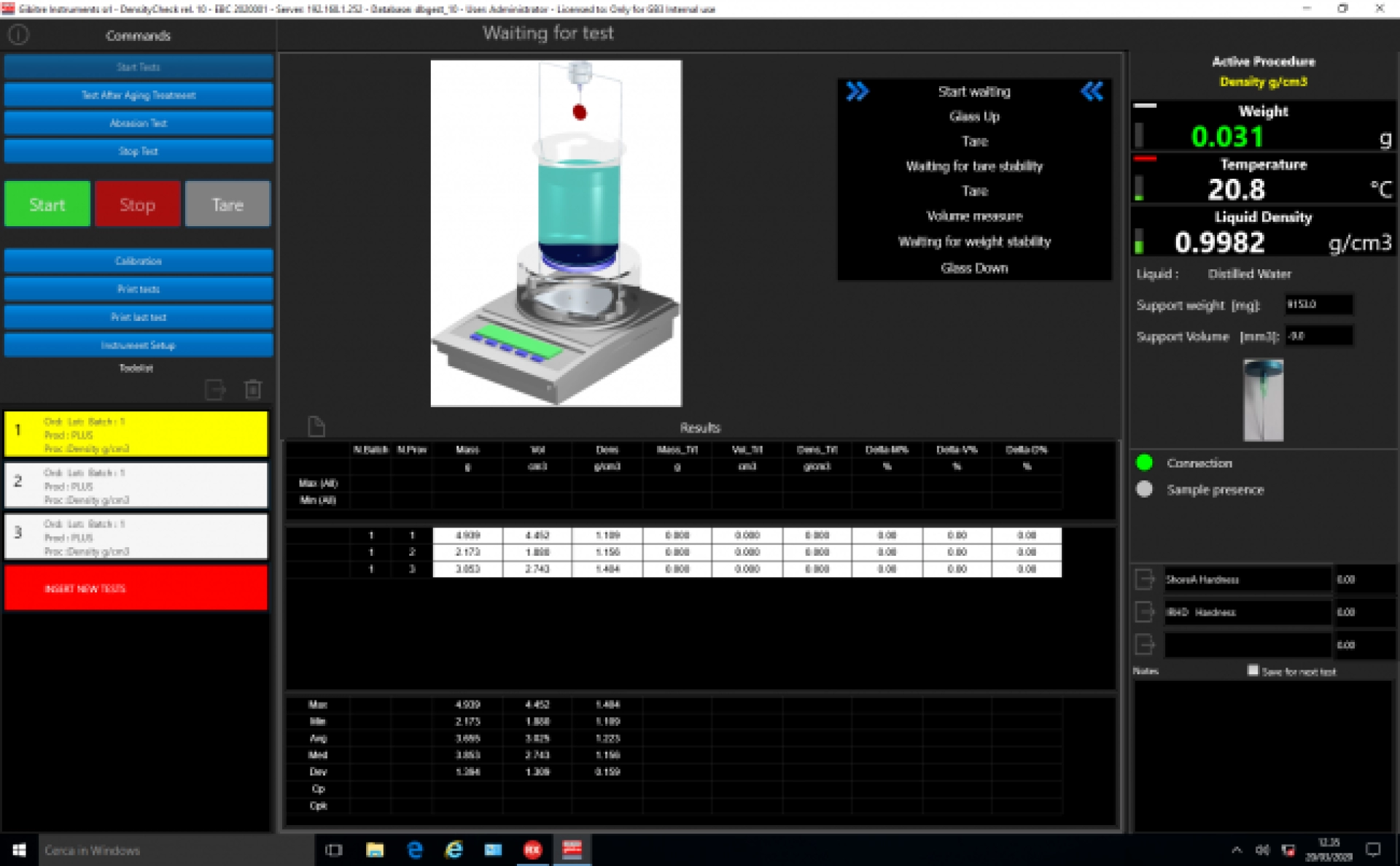
The software permits to execute automatically the density test and to measure Mass and Volume % variation after aging.


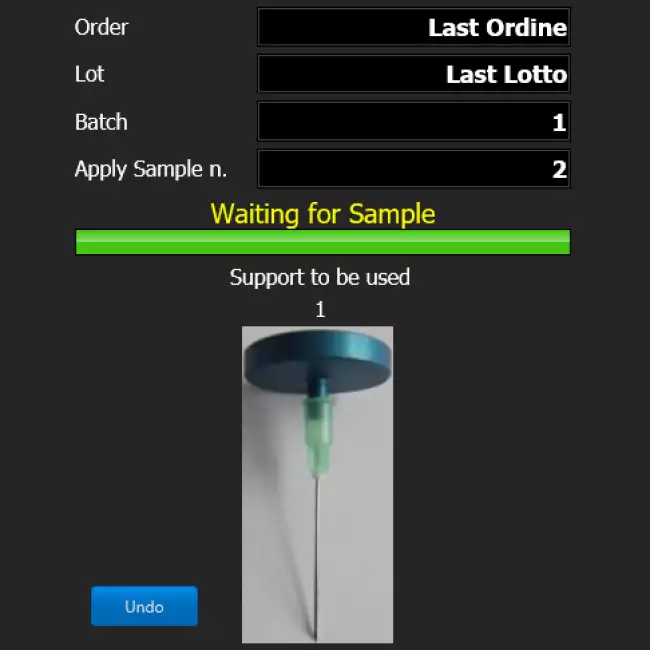
Smart Test Identification 
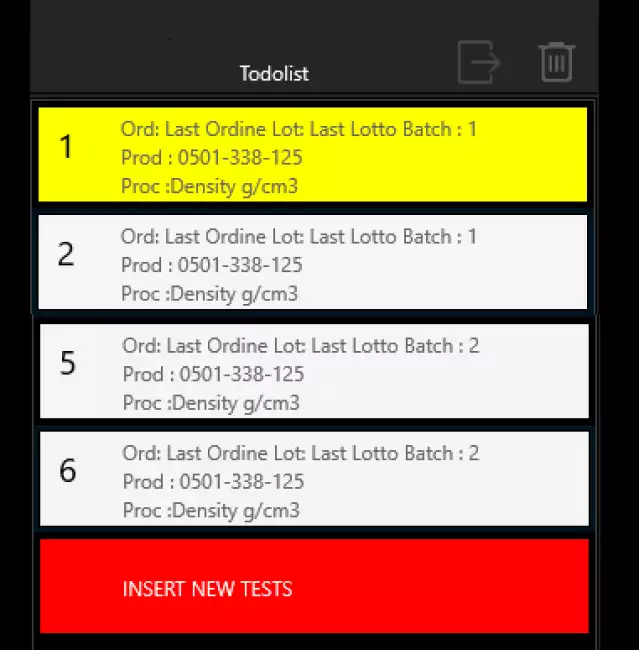
One of the key characteristics to make an instrument functional is the simplicity in identifying the tests to be carried out.
The new Gibitre release 10 programs allow you to:
• Reduce the time for insertion
• Do not make identification errors
• Identify the correct test procedure for the product
• Have a complete traceability of the archived Results.

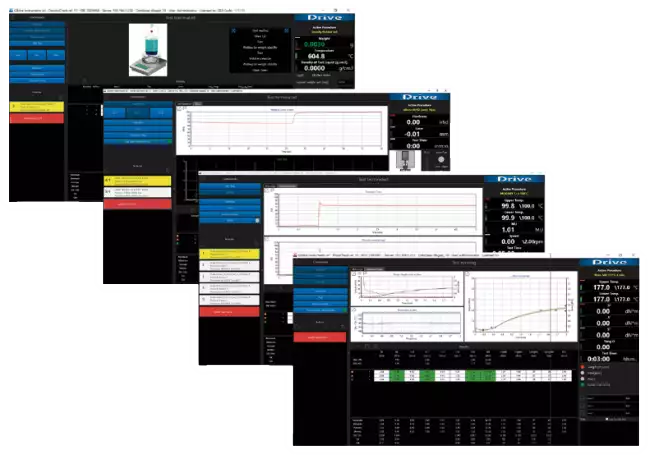
Automatic performance of Density Test 
Enter the list of tests to be performed by manual selection or barcode reader.
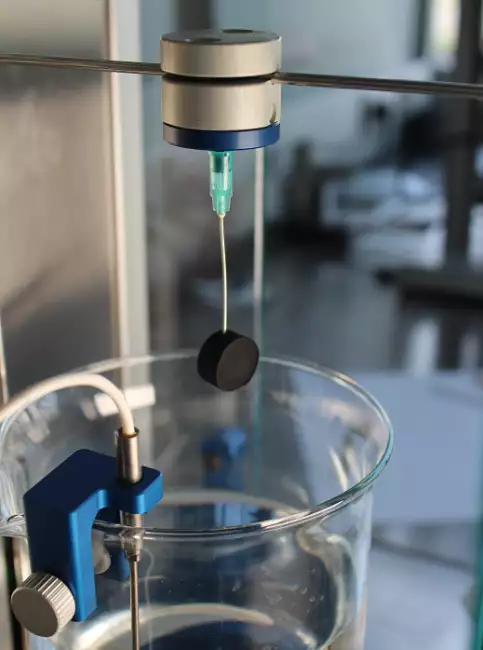
Then apply the specimen to the magnetic stand.
Finished !
The instrument:
● Waits for the specimen to be applied
● Measures your weight
● Raises the glass with the comparison liquid
● Measures the volume
● Calculates density
● Lowers the glass
● Compares the result with the tolerance limits
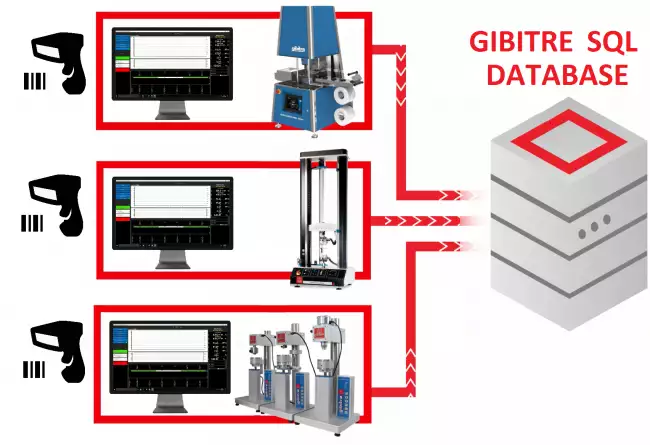
● Saves the result in the SQL database
... and is ready for the next specimen
All in about 10 seconds.

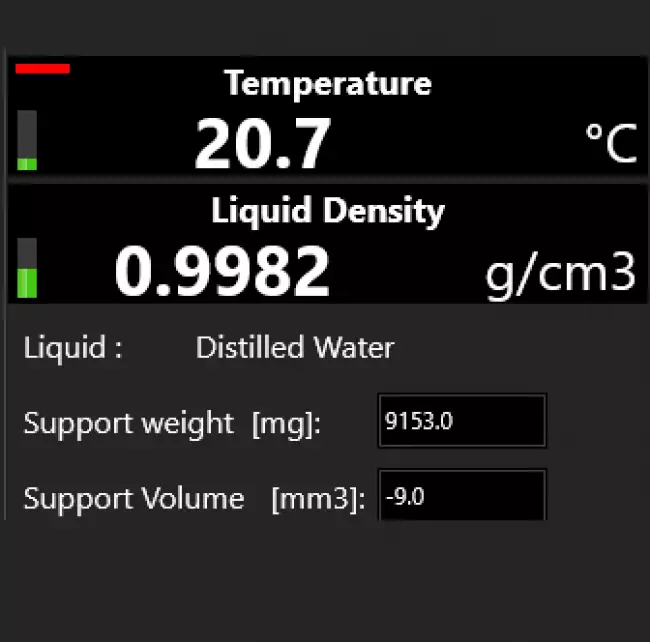
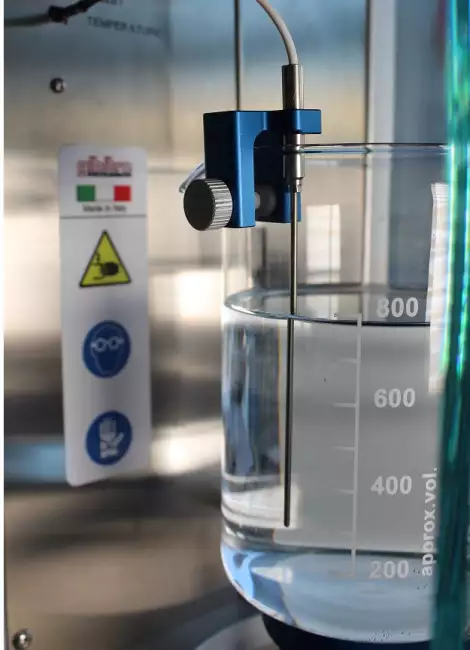
Reading of the temperature of test liquid 
The calibrated temperature probe inside the beaker measures the temperature of the reference liquids.
The software corrects the density of the test liquids based on the temperature and uses the correct value for the measurements.
Each result is saved together with the temperature measurement and the real density of the comparison liquid.
Seasonal variations in density measurement with changing laboratory temperature are just a memory!


Measure of Mass and Volume Percentage Variation 
Aging tests on Rubber products are performed according to international standards (ISO 1817, ASTM D471, etc) to evaluate the capability of the product to perform correctly in use conditions.
The aim of this test is to measure the Mass and Volume Percentage variation after the aging of the samples and to compare the results with the expected tolerance limits.
The instrument performs this operation automatically
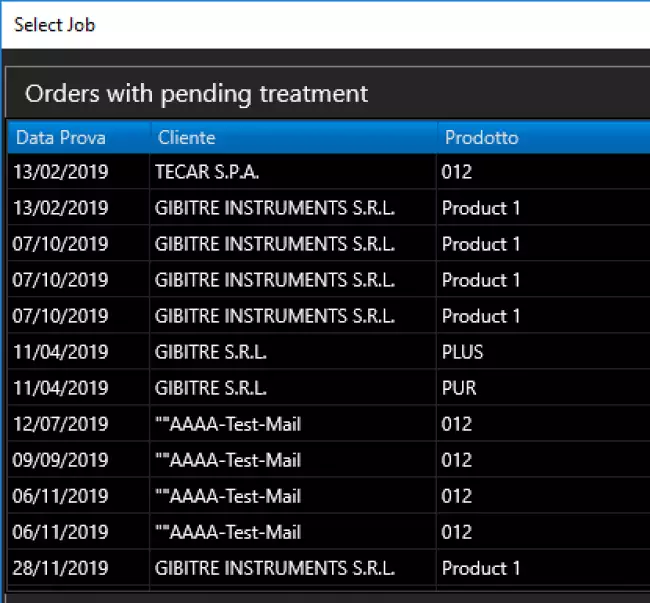
In order to measure the Mass and Volume variation of the samples, you need to:
● Prepare at least 3 samples
● Perform a test with the instrument on the samples before aging
● Age the samples at the requested aging conditions
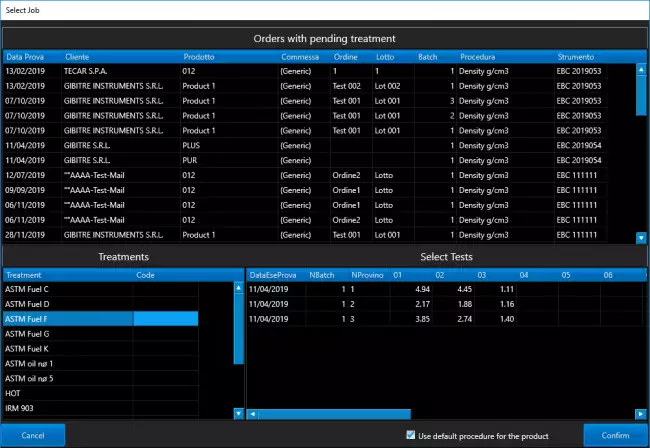
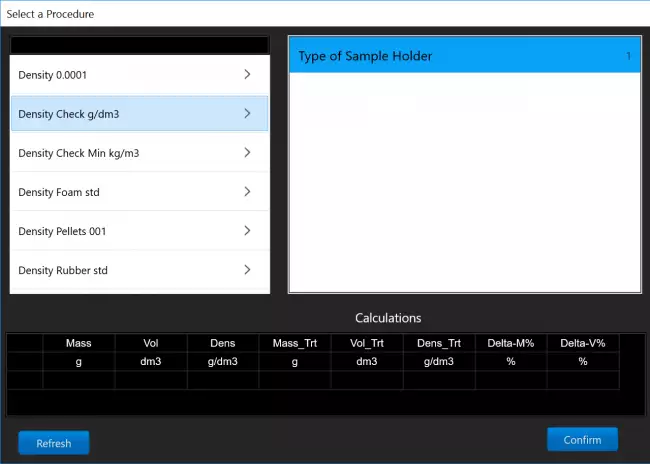
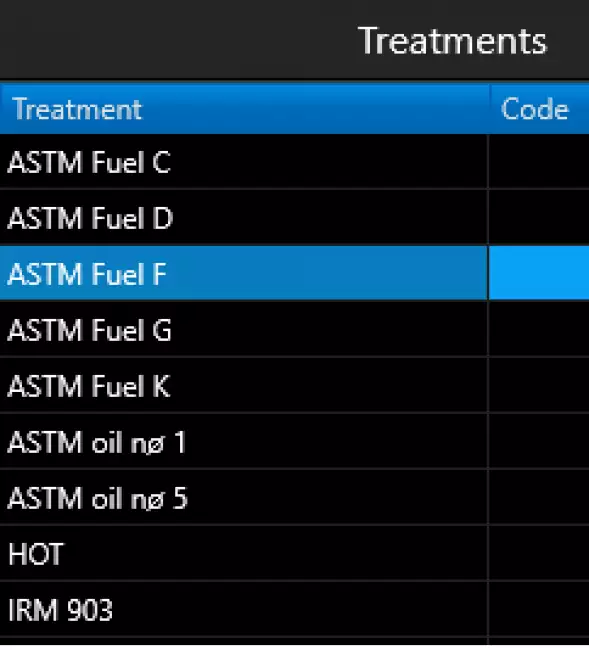
● Select the identification of the tests originally made on the samples from the List of Tests with Pending Treatments
● Repeat the test on the samples
The software will do the rest:
● Calculates the Percentage Mass and Volume variation
● Compares the results with tolerance limits for the product and for the treatment selected
● Stores the results to the SQL Database

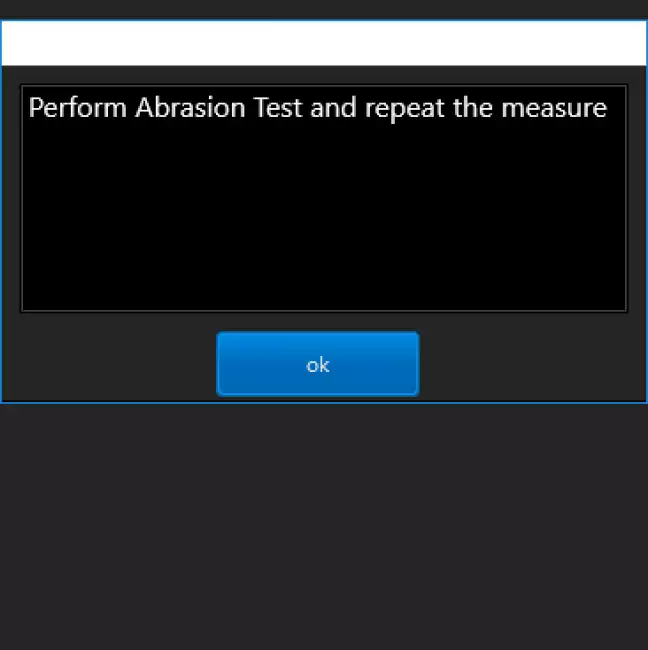
Testing of Abrasion samples 
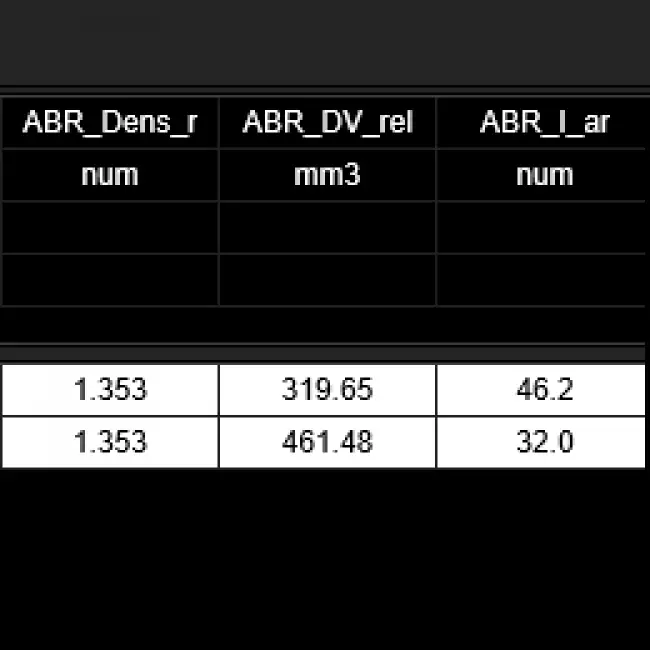
This function permits to perform easily the sequence of operations requested for the measure of the samples before and after the Abrasion Resistance test described by ISO 4649 and ASTM D5963 standards.
The software performs the following operations:
● Recording of the level of abrasiveness of the paper by differential weighing of the certified specimen
● Measurement of the Volume and Density of the specimen to be submitted to abrasion test
● Measurement of the volume of the specimen following the abrasion test
● Automatic Calculation of Volume Loss
● Automatic calculation of the Abrasion Resistance Index
● Automatic recording of the results in the Gibitre instruments SQL database

Preparation of Test Reports 
Version 10 programs make the following options available for preparing test reports:
• Selection of printing language
• Company logo insertion
• Print a single test / a Group of tests
• Print of Test Curves
• Print Numerical Results
• Print the Limits of Tolerance
• Print Statistical Results
• Print Legend with explanation of results
• Print the Operator Signature
• Print Customized Notes
• Preparation of PDF file

The program integrates a REPORT EDITOR that allows you to completely edit the report and prepare fully customized report formats


Management of Test Results 
The results and test curves of all the tests carried out are saved in the Gibitre SQL database and are available through the Datagest program.

Datagest is the Laboratory Information Management System (LIMS) which is always installed in combination with all Gibitre instrument-control programs.
The program is the collector for all the test result produced with the instruments connected and permits to manage the common Archives used by the instruments (Product List, Customer List, Tolerance limits, Order List, etc)


Custom Setups 
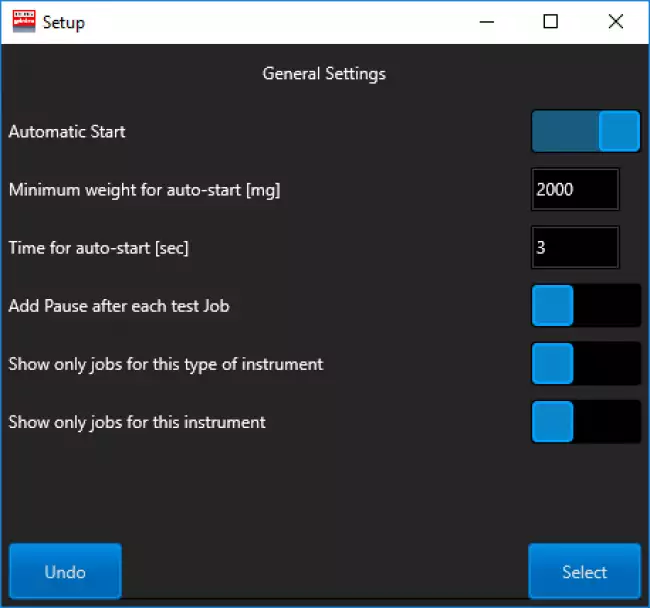
The Instrument Configuration page allows you to adapt the operating modes to your needs.
The configurations are saved and applied with each new opening.
The configurations are editable based on the operator access level.

Tolerance Limits 
The Datagest program allows you to define specific tolerance limits for each Product, Customer, Test Procedure and Aging Treatment.
For each result to be calculated, tolerance limits and alarm limits can be defined.
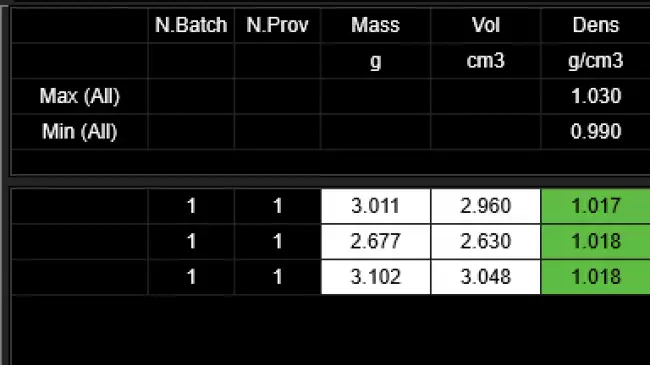
The comparison between the results and the tolerance limits is carried out automatically at the end of each test: the test results are colored (Green, Yellow or Red) based on the outcome of the comparison with the limits.
The outcome of the check is saved in the database together with the results.


Statistics of ongoing tests 
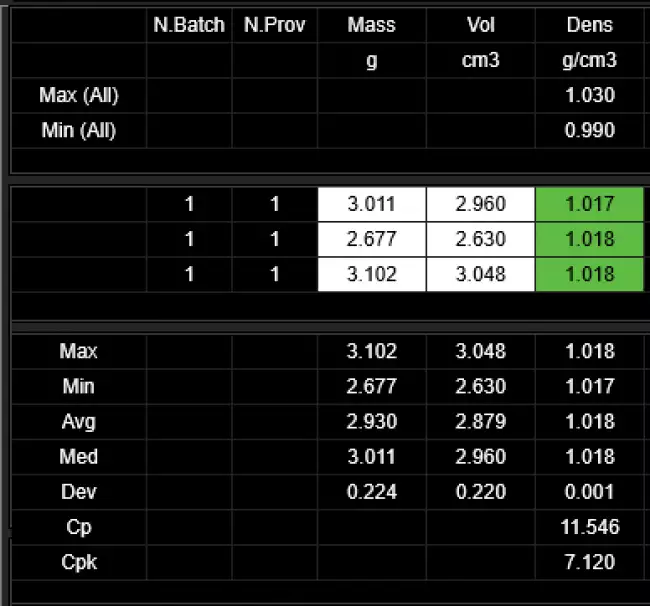
The programs automatically process the statistical analysis of the tests in progress by calculating:
• Maximum
• Minimum
• Average
• Median
• Standard deviation
• Cp
• Cpk
In addition, the Gaussian curve relative to the results is shown together with the tolerance limits to immediately highlight the progress of the tests in progress.
The Datagest program allows you to process more detailed statistics related to the saved results and to represent X and R Charts by grouping data by order, batch, batch, date, etc.

Test Procedures 
The SQL database that is installed together with the tools contains predefined test procedures for each type of Gibitre tool.
Test procedures contain:
• settings for automatic instrument adjustment
• the list of results to be calculated on the basis of what is required by international standards.
The Datagest program allows you to: copy, modify, create the Test Procedures to adapt them to your needs.

Test procedures can be exported and imported. This allows Gibitre Remote Support to support you in the preparation and testing of customized Test Procedures.

Language Selection 
All the programs produced by Gibitre are multi-language and allow the operator to select the language of use.
The test report can be produced in the desired language regardless of the language of use of the program.
The languages available at the moment are: Italian, English, French, German, Spanish, Portuguese, Russian, Polish, Czech, Turkish, Japanese, Chinese.



Hardware requirements 
• Programs can be installed on standard PCs with WINDOWS 10 or 11 OPERATING SYSTEM.
• The CONNECTION between the instruments and the PC is made using the USB CABLE supplied with the instrument.
• The programs are COMPATIBLE WITH ANTIVIRUS, and other programs installed on the PC.


Gibitre Instruments
Via dell'industria, 18
Bergamo (Italy)
te. +39 035 461146
www.gibitre.it
info@gibitre.it

Copyright Gibitre Instruments
The software permits to execute automatically the density test and to measure Mass and Volume % variation after aging.
Campi di applicazione  >  Prove su pneumatici  >  Rheocheck MD - Drive
DensityCheck - Software
software density: ソフトウェア Gibitre。密度計の制御用プログラム Gibitre Density-Check。試験結果と統計情報を表示するプログラムのメインページ。
Get a Quotation

The software permits to execute automatically the density test and to measure Mass and Volume % variation after aging.

Smart Test Identification 

One of the key characteristics to make an instrument functional is the simplicity in identifying the tests to be carried out.
The new Gibitre release 10 programs allow you to:
• Reduce the time for insertion
• Do not make identification errors
• Identify the correct test procedure for the product
• Have a complete traceability of the archived Results.

software density: クリックで身分証明書を入力
クリックで身分証明書を入力

Automatic performance of Density Test 

Enter the list of tests to be performed by manual selection or barcode reader.
Then apply the specimen to the magnetic stand.
Finished !
The instrument:
● Waits for the specimen to be applied
● Measures your weight
● Raises the glass with the comparison liquid
● Measures the volume
● Calculates density
● Lowers the glass
● Compares the result with the tolerance limits
● Saves the result in the SQL database
... and is ready for the next specimen
All in about 10 seconds.

software density: 密度計 Density-Check。本機器用ソフトウェア。本ソフトウェアは、測定対象試料が機器内に挿入されるのを待機し、自動測定サイクルを開始します。 software density: 密度計 Density-Check。本機器用ソフトウェア。本ソフトウェアは、測定対象試料が機器内に挿入されるのを待機し、自動測定サイクルを開始します。 software density: Gibitreソフトウェア。カスタマイズされた視覚化で実行されるテストのシーケンス。

Reading of the temperature of test liquid 

The calibrated temperature probe inside the beaker measures the temperature of the reference liquids.
The software corrects the density of the test liquids based on the temperature and uses the correct value for the measurements.
Each result is saved together with the temperature measurement and the real density of the comparison liquid.
Seasonal variations in density measurement with changing laboratory temperature are just a memory!

software density: 自動密度計Density-Check。基準液の密度値を自動調整するための温度プローブの詳細。 software density: 自動密度計Density-Check。基準液の密度値を自動調整するための温度プローブの詳細。 software density: Gibitreソフトウェア。Density-Check装置用制御ソフトウェア。基準液密度を自動補正する温度測定の詳細。
 

Measure of Mass and Volume Percentage Variation 

Aging tests on Rubber products are performed according to international standards (ISO 1817, ASTM D471, etc) to evaluate the capability of the product to perform correctly in use conditions.
The aim of this test is to measure the Mass and Volume Percentage variation after the aging of the samples and to compare the results with the expected tolerance limits.
The instrument performs this operation automatically
In order to measure the Mass and Volume variation of the samples, you need to:
● Prepare at least 3 samples
● Perform a test with the instrument on the samples before aging
● Age the samples at the requested aging conditions
● Select the identification of the tests originally made on the samples from the List of Tests with Pending Treatments
● Repeat the test on the samples
The software will do the rest:
● Calculates the Percentage Mass and Volume variation
● Compares the results with tolerance limits for the product and for the treatment selected
● Stores the results to the SQL Database

software density: デンシェック・ソフトウェア:エージング後のテストの選択 software density: デンシェック・ソフトウェア:エージング後のテストの選択 software density: デンシェック・ソフトウェア:エージング後の試験における試験選択の詳細 software density: デンシェック・ソフトウェア:エージング後の試験における試験選択の詳細

Testing of Abrasion samples 

This function permits to perform easily the sequence of operations requested for the measure of the samples before and after the Abrasion Resistance test described by ISO 4649 and ASTM D5963 standards.
The software performs the following operations:
● Recording of the level of abrasiveness of the paper by differential weighing of the certified specimen
● Measurement of the Volume and Density of the specimen to be submitted to abrasion test
● Measurement of the volume of the specimen following the abrasion test
● Automatic Calculation of Volume Loss
● Automatic calculation of the Abrasion Resistance Index
● Automatic recording of the results in the Gibitre instruments SQL database

software density: 密度チェック密度計。ISO 4649およびASTM D5963に準拠した耐摩耗性の自動測定用摩耗試験片の測定器への適用例。 software density: 密度チェック密度計。ISO 4649およびASTM D5963に準拠した耐摩耗性の自動測定用摩耗試験片の測定器への適用例。 software density: 密度計用ソフトウェア。摩耗試験用オプション摩耗試験結果が不適合であった場合のメッセージ。 software density: 密度-密度計で確認。摩耗試験をソフトウェアで記録。計算結果。

Preparation of Test Reports 

Version 10 programs make the following options available for preparing test reports:
• Selection of printing language
• Company logo insertion
• Print a single test / a Group of tests
• Print of Test Curves
• Print Numerical Results
• Print the Limits of Tolerance
• Print Statistical Results
• Print Legend with explanation of results
• Print the Operator Signature
• Print Customized Notes
• Preparation of PDF file

The program integrates a REPORT EDITOR that allows you to completely edit the report and prepare fully customized report formats

software density: テストレポート:あなたの名刺 software density: テストレポート:あなたの名刺 software density: Gibitreプログラム。装置ソフトウェアにより、実施した試験結果を記載したカスタマイズされた試験報告書を作成することができます。レポートテンプレートと印刷言語の選択ページ。 software density: カスタマイズされたレポートフォーマットの準備

Management of Test Results 

The results and test curves of all the tests carried out are saved in the Gibitre SQL database and are available through the Datagest program.

Datagest is the Laboratory Information Management System (LIMS) which is always installed in combination with all Gibitre instrument-control programs.
The program is the collector for all the test result produced with the instruments connected and permits to manage the common Archives used by the instruments (Product List, Customer List, Tolerance limits, Order List, etc)

software density: データゲスト:研究室のための頭脳
データゲスト:研究室のための頭脳

Custom Setups 

The Instrument Configuration page allows you to adapt the operating modes to your needs.
The configurations are saved and applied with each new opening.
The configurations are editable based on the operator access level.

software density: 働き方に合わせたツールの設定
働き方に合わせたツールの設定

Tolerance Limits 

The Datagest program allows you to define specific tolerance limits for each Product, Customer, Test Procedure and Aging Treatment.
For each result to be calculated, tolerance limits and alarm limits can be defined.
The comparison between the results and the tolerance limits is carried out automatically at the end of each test: the test results are colored (Green, Yellow or Red) based on the outcome of the comparison with the limits.
The outcome of the check is saved in the database together with the results.

software density: 許容限界の明確な管理
許容限界の明確な管理

Statistics of ongoing tests 

The programs automatically process the statistical analysis of the tests in progress by calculating:
• Maximum
• Minimum
• Average
• Median
• Standard deviation
• Cp
• Cpk
In addition, the Gaussian curve relative to the results is shown together with the tolerance limits to immediately highlight the progress of the tests in progress.
The Datagest program allows you to process more detailed statistics related to the saved results and to represent X and R Charts by grouping data by order, batch, batch, date, etc.

software density: 統計分析:即時フィードバック
統計分析:即時フィードバック

Test Procedures 

The SQL database that is installed together with the tools contains predefined test procedures for each type of Gibitre tool.
Test procedures contain:
• settings for automatic instrument adjustment
• the list of results to be calculated on the basis of what is required by international standards.
The Datagest program allows you to: copy, modify, create the Test Procedures to adapt them to your needs.

Test procedures can be exported and imported. This allows Gibitre Remote Support to support you in the preparation and testing of customized Test Procedures.

software density: 試験手順:完全な試験管理
試験手順:完全な試験管理

Language Selection 

All the programs produced by Gibitre are multi-language and allow the operator to select the language of use.
The test report can be produced in the desired language regardless of the language of use of the program.
The languages available at the moment are: Italian, English, French, German, Spanish, Portuguese, Russian, Polish, Czech, Turkish, Japanese, Chinese.

software density: 言語を選ぶ
言語を選ぶ

Hardware requirements 

• Programs can be installed on standard PCs with WINDOWS 10 or 11 OPERATING SYSTEM.
• The CONNECTION between the instruments and the PC is made using the USB CABLE supplied with the instrument.
• The programs are COMPATIBLE WITH ANTIVIRUS, and other programs installed on the PC.

software density: 標準的なPCで十分
標準的なPCで十分
Download
General catalogue mail request

Density Check - Drive
Vedi anche: Density-Check 電子密度計。装置の全景。
See Also   >
Gibitre Software Platform
Vedi anche: ラボ用ソフトウェア
See Also   >
Datagest Software
Vedi anche: データゲスト:研究室のための頭脳
See Also   >
News
Call to action
Ask for quotation
a guided way to ask
for a quotation
Mail
info@gibitre.it
The good old e-mail
ready for every season
Phone
+39 035 460146
We welcome your calls Monday through Friday from 8:30 a.m. to 5:30 p.m. in your local time zone.
Newsletter
Subscribe
Stay updated
with the last news
of your sector
Local agent
from: -
See the whole list

In your country
in your language
at your service
Gibitre Instruments S.r.l., Via dell'industria 73, 24126 Bergamo Italia, pec@gibitre-instruments.it P. IVA: IT02827900164 CCIAA REA Bergamo: 326486 | ©2018 - 2026 Gibitre Instruments
Optimist.it
Welcome to the Gibitre Instruments web site
Please chose the preferred Cookie Management.
Benvenuti nel sito Gibitre Instruments
Per continuare scegliete la Gestione dei Cookie che preferite.
Cookies policy
For detailed informations about the use of cookies, please read our
Cookies Management Practice.

Gestione dei Cookies
Per maggiori informazioni sui cookie utilizzati consultate la nostra
Procedura sull'Uso dei Cookies.