Diagnostic and rapid assistance service via remote access software

Charactersistics of the service The purposes of the service are:
• the identification of working problems of instruments' connected to Gibitre softwares;
• the remote installation of programs on new pcs.
• the service is provided using Team Viewer software, for which Gibitre owns official licenses.
• the remote assistance must be explicitly requested and activated by the customer every time because the installation of the program does not permit any kind of automatic or not explicitily requested reconnections to your computers
• for the use of remote assistance software an active internet connection of the pc is required.
DOWNLOAD THE CONNECTION PROGRAM To activate the connection:
• download the Connection Program using the link below
• save the program on the desktop
• start the program
• call Gibitre Technical Assistance service at +39 035 460146 and communicate the connection ID Code.
Subscription of the service The service is free of cost for assistance of instruments in warranty periods and for customers who subscribe a maintenance contract including this option.
Other customers who wish to activate the service may download the subsciption form and send it filled and signed at support@gibitre.it.
To activate the connection:
• download team viewer using the link
• save the program on the desktop
• start the program
• call Gibitre Technical Assistance service at +39 035 460146 and communicate the connection ID Code.
Remote assistance Service - 원격 액세스 소프트웨어를 통한 진단 및 신속한 지원 서비스
서비스의 목적
이 서비스의 목적은 다음과 같습니다.
• Gibitre 소프트웨어에 연결된 도구의 작동 문제 식별.
• 새로운 PC에 프로그램을 원격 설치가 가능합니다. 서비스의 특징
이 서비스는 Gibitre가 공식 라이선스를 보유한 Team Viewer 소프트웨어를 사용하여 제공됩니다.
원격 지원은 명시적으로 요청 되어야 하며 프로그램 설치로 인해 컴퓨터에 자동 또는 명시적으로 요청 된 재연결이 허용되지 않으므로 매번 고객이 요청 해야 합니다.
원격 지원 소프트웨어를 사용하려면 PC의 인터넷 연결이 필요합니다.
서비스 가입
이 서비스는 보증 기간의 기기 및 옵션을 포함한 유지 보수 계약을 맺은 고객을 위하여 무료로 제공됩니다.
Gibitre 웹 사이트에 액세스하여 서비스를 쉽게 받을 수 있습니다.
Diagnostic and rapid assistance service via remote access software

Charactersistics of the service
The purposes of the service are:
• the identification of working problems of instruments' connected to Gibitre softwares;
• the remote installation of programs on new pcs.
• the service is provided using Team Viewer software, for which Gibitre owns official licenses.
• the remote assistance must be explicitly requested and activated by the customer every time because the installation of the program does not permit any kind of automatic or not explicitily requested reconnections to your computers
• for the use of remote assistance software an active internet connection of the pc is required.
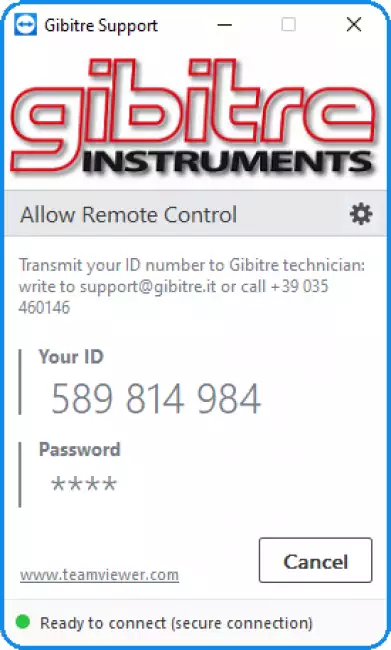
Team-Viewer 소프트웨어를 통한 원격 지원 서비스. 고객 연결 요청 페이지.
DOWNLOAD THE CONNECTION PROGRAM
To activate the connection:
• download the Connection Program using the link below
• save the program on the desktop
• start the program
• call Gibitre Technical Assistance service at +39 035 460146 and communicate the connection ID Code.
The service is free of cost for assistance of instruments in warranty periods and for customers who subscribe a maintenance contract including this option.
Other customers who wish to activate the service may download the subsciption form and send it filled and signed at support@gibitre.it.
To activate the connection:
• download team viewer using the link
• save the program on the desktop
• start the program
• call Gibitre Technical Assistance service at +39 035 460146 and communicate the connection ID Code.
Welcome to the Gibitre Instruments web site Please chose the preferred Cookie Management.
Benvenuti nel sito Gibitre Instruments Per continuare scegliete la Gestione dei Cookie che preferite.
Mandatory/Strettamente necessari
Technical cookies/Cookie tecnici
They are strictly necessary for the functioning of the website because they enable functions to facilitate user navigation, for example to access a personal profile without having to log in each time or to memorize the language in which they wish to browse the site without resetting it each time.
Sono strettamente necessari al funzionamento del sito web perché abilitano funzioni per facilitare la navigazione dell'utente, ad esempio per accedere al proprio profilo senza dover eseguire ogni volta il login oppure per memorizzare la lingua con cui desidera navigare sul sito senza reimpostarla ogni volta.
Accept/Accetto
Analytical cookies/Cookie analitici
They can be first or third party, they are installed to collect information on the use of the website. They are useful to statistically analyze accesses and visits to the site and to be able to improve its structure, navigation logics and contents.
Possono essere di prima o di terza parte, sono installati per collezionare informazioni sull'uso del sito web. Sono utili per analizzare statisticamente gli accessi e le visite al sito e per poterne migliorarne la struttura, le logiche di navigazione e i contenuti.
Accept/Accetto
Profilation cookies/Cookie di profilazione
Profiling cookies and social plugins, which can be first or third party, are used to track the user's navigation, analyze his behavior for marketing purposes and create profiles regarding his tastes, habits, choices, etc. In this way it is possible, for example, to transmit targeted advertising messages in relation to the interests of the user and in line with the preferences expressed by them while browsing online.
I cookie di profilazione e i social plugin, che possono essere di prima o di terza parte, servono a tracciare la navigazione dell'utente, analizzare il suo comportamento ai fini marketing e creare profili in merito ai suoi gusti, abitudini, scelte, etc. In questo modo è possibile ad esempio trasmettere messaggi pubblicitari mirati in relazione agli interessi dell'utente ed in linea con le preferenze da questi manifestate nella navigazione online.
Cookies policy For detailed informations about the use of cookies, please read our Cookies Management Practice.
Gestione dei Cookies Per maggiori informazioni sui cookie utilizzati consultate la nostra Procedura sull'Uso dei Cookies.