Remote assistance Service
Diagnostic and rapid assistance service via remote access software



Charactersistics of the service 
The purposes of the service are:
• the identification of working problems of instruments' connected to Gibitre softwares;
• the remote installation of programs on new pcs.
• the service is provided using Team Viewer software, for which Gibitre owns official licenses.
• the remote assistance must be explicitly requested and activated by the customer every time because the installation of the program does not permit any kind of automatic or not explicitily requested reconnections to your computers
• for the use of remote assistance software an active internet connection of the pc is required.
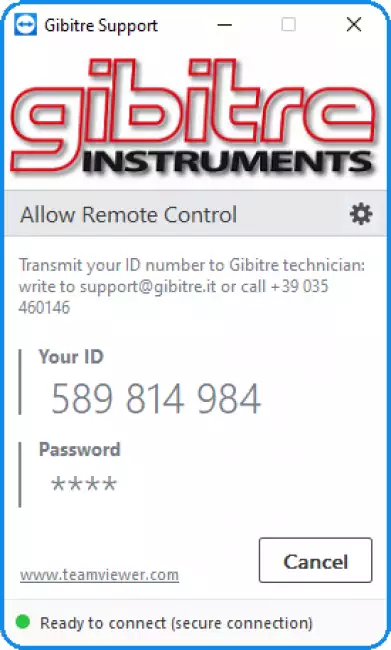

DOWNLOAD THE CONNECTION PROGRAM 
To activate the connection:
• download the Connection Program using the link below
• save the program on the desktop
• start the program
• call Gibitre Technical Assistance service at +39 035 460146 and communicate the connection ID Code.

Subscription of the service 
The service is free of cost for assistance of instruments in warranty periods and for customers who subscribe a maintenance contract including this option.
Other customers who wish to activate the service may download the subsciption form and send it filled and signed at support@gibitre.it.

To activate the connection:
• download team viewer using the link
• save the program on the desktop
• start the program
• call Gibitre Technical Assistance service at +39 035 460146 and communicate the connection ID Code.


Gibitre Instruments
Via dell'industria, 18
Bergamo (Italy)
te. +39 035 461146
www.gibitre.it
info@gibitre.it

Copyright Gibitre Instruments
Diagnostic and rapid assistance service via remote access software
Campi di applicazione  >  Prove su pneumatici  >  Rheocheck MD - Drive
Remote assistance Service
remote assistance: A Gibitre távoli segítségnyújtási szolgáltatásokat nyújt a Team Viewer program vagy ügyfélspecifikus programok segítségével. A szolgáltatás aktiválási oldal borítóképe.
Get a Quotation


Remote assistance Service - Gyors diagnosztikai és szerviz szolgáltatás távoli hozzáférésű szoftver segítségével
A szolgáltatás célja
A szolgáltatás céljai az alábbiak:
• a Gibitre szoftverekhez csatlakoztatott készülékek működtetésével kapcsolatos problémák azonosítása
• programok távoli telepítése új PC-kre
A szolgáltatás jellemzői
A szolgáltatást a Team Viewer szoftveren keresztül nyújtjuk; a Gibitre rendelkezik az ehhez szükséges hivatalos licencekkel.
A távoli szolgáltatást minden esetben a megrendelőnek kell igényelnie és kezdeményeznie, mivel a program telepítése semmilyen formában nem teszi lehetővé a megrendelő számítógépeihez való automatikus vagy nem kívánt kapcsolódást
A távoli segítségnyújtás program használatához a számítógépen aktív internetkapcsolat szükséges.
Előfizetés a szolgáltatásra
A szolgáltatás ingyenes a készülékre vállalt garancia időtartamán belül, valamint azon ügyfeleink számára, akik a szolgáltatást tartalmazó karbantartási szerződést kötöttek. A szolgáltatás egyszerűen aktiválható a Gibitre weboldalán keresztül.

Diagnostic and rapid assistance service via remote access software

Charactersistics of the service 

The purposes of the service are:
• the identification of working problems of instruments' connected to Gibitre softwares;
• the remote installation of programs on new pcs.
• the service is provided using Team Viewer software, for which Gibitre owns official licenses.
• the remote assistance must be explicitly requested and activated by the customer every time because the installation of the program does not permit any kind of automatic or not explicitily requested reconnections to your computers
• for the use of remote assistance software an active internet connection of the pc is required.

remote assistance: Távoli segítségnyújtási szolgáltatás a Team-Viewer szoftveren keresztül. Ügyfélkapcsolat-kérő oldal.
Távoli segítségnyújtási szolgáltatás a Team-Viewer szoftveren keresztül. Ügyfélkapcsolat-kérő oldal.

DOWNLOAD THE CONNECTION PROGRAM 

To activate the connection:
• download the Connection Program using the link below
• save the program on the desktop
• start the program
• call Gibitre Technical Assistance service at +39 035 460146 and communicate the connection ID Code.

Download the Connection Program

Subscription of the service 

The service is free of cost for assistance of instruments in warranty periods and for customers who subscribe a maintenance contract including this option.
Other customers who wish to activate the service may download the subsciption form and send it filled and signed at support@gibitre.it.

To activate the connection:
• download team viewer using the link
• save the program on the desktop
• start the program
• call Gibitre Technical Assistance service at +39 035 460146 and communicate the connection ID Code.

Download the Subsciption Form in Italian
Download the Subsciption Form in English
 
Download
Brief product leaflet
General catalogue mail request

Maintenance and Calibration Service
Vedi anche: Technikai segítségnyújtási szolgáltatások. A szolgáltatások oldal borítóképe egy laboratóriumi köpenyes férfival.
See Also   >
News
Call to action
Ask for quotation
a guided way to ask
for a quotation
Mail
info@gibitre.it
The good old e-mail
ready for every season
Phone
+39 035 460146
We welcome your calls Monday through Friday from 8:30 a.m. to 5:30 p.m. in your local time zone.
Newsletter
Subscribe
Stay updated
with the last news
of your sector
Local agent
from: -
See the whole list

In your country
in your language
at your service
Gibitre Instruments S.r.l., Via dell'industria 73, 24126 Bergamo Italia, pec@gibitre-instruments.it P. IVA: IT02827900164 CCIAA REA Bergamo: 326486 | ©2018 - 2026 Gibitre Instruments
Optimist.it
Welcome to the Gibitre Instruments web site
Please chose the preferred Cookie Management.
Benvenuti nel sito Gibitre Instruments
Per continuare scegliete la Gestione dei Cookie che preferite.
Cookies policy
For detailed informations about the use of cookies, please read our
Cookies Management Practice.

Gestione dei Cookies
Per maggiori informazioni sui cookie utilizzati consultate la nostra
Procedura sull'Uso dei Cookies.